# Backlinks Search Question
**URL:** https://discourse.devontechnologies.com/t/backlinks-search-question/74622
**Category:** DEVONagent
**Created:** [February 14, 2023, 3:31am UTC](https://discourse.devontechnologies.com/t/backlinks-search-question/74622 "2023-02-14T03:31:30Z")
**Posts on this page:** 20
**Page:** 1
### Author:  [@leehammond](https://discourse.devontechnologies.com/u/leehammond)
#### Post date: [February 14, 2023, 3:31am UTC](https://discourse.devontechnologies.com/t/backlinks-search-question/74622/1 "2023-02-14T03:31:31Z")
I want to set up DevonAgent to search backlinks to sites. I am not getting the results I see when using Google directly. Here’s an example comparing a native google search with an agent query:
[Google Search](https://www.google.com/search?q=blink182.com+-site%3Ablink182.com+site%3Aallmusic.com) - returns 2 recommended results; 42 in total

DevonAgent search set-up:
- Query term = [blink182.com](http://blink182.com)
- Follow Links = off
- Express Search = on
- Advanced: exclude domains: [blink182.com](http://blink182.com) _(so I only see backlinks, no [blink182.com](http://blink182.com) links)_
- Sites: [allmusic.com](http://allmusic.com) _(I’m adding this to limit results to backlinks from [allmusic.com](http://allmusic.com) In practice I would search for all backlinks across the web._
DevonAgent search is returning 5 links from other domains but not [allmusic.com](http://allmusic.com) which I expected the sites setting to limit for.

Can someone take a look and advise how I should set this up – search set attached.
[blink182.com Backlinks.agentSet.zip](https://discourse.devontechnologies.com/uploads/short-url/p8TZIFwkARFDfm2DXrzyG9lKsEI.zip) (1.0 KB)
---
### Author:  [@BLUEFROG](https://discourse.devontechnologies.com/u/BLUEFROG)
#### Post date: [February 14, 2023, 7:03am UTC](https://discourse.devontechnologies.com/t/backlinks-search-question/74622/2 "2023-02-14T07:03:31Z")
> [@leehammond](#):
>
> Here’s an example comparing a native google search with an agent query:…
DEVONagent isn’t a front-end to Google nor should you compare the two. DEVONagent is made for filtering results before delivering them.
If you want unfiltered searches, use the **Express** option. Alternatively, you can just use Google in a browser.
---
### Author:  [@leehammond](https://discourse.devontechnologies.com/u/leehammond)
#### Post date: [February 14, 2023, 2:19pm UTC](https://discourse.devontechnologies.com/t/backlinks-search-question/74622/3 "2023-02-14T14:19:30Z")
I’m only using Google Search to debug and illustrate the issue for this forum. I want to use DevonAgent for its ability to automate and capture results to DT3 in ongoing fashion (scheduled)
Express is enabled; again for debugging, ultimately I’ll want to filter out past results and similar pages.
How should I be setting up a query like this in DevonAgent Pro?
`search for the term blink182.com excluding results from the domain blink182.com`
to test my query I added ‘[allmusic.com](http://allmusic.com)’ to the sites panel to limit the results to a single domain
- In practice I would want results from across the internet. I don’t want to set up a custom search plug-in for [allmusic.com](http://allmusic.com)
- my project has nothing to do with music or [blink182.com](http://blink182.com); I set them up only as examples for this forum.
---
### Author:  [@leehammond](https://discourse.devontechnologies.com/u/leehammond)
#### Post date: [February 16, 2023, 4:37pm UTC](https://discourse.devontechnologies.com/t/backlinks-search-question/74622/4 "2023-02-16T16:37:03Z")
@BLUEFROG,
Do you mind taking a look and answering my question?
I’ve read the DAP documentation back to front and haven’t found the answer yet.
---
### Author:  [@BLUEFROG](https://discourse.devontechnologies.com/u/BLUEFROG)
#### Post date: [February 16, 2023, 6:56pm UTC](https://discourse.devontechnologies.com/t/backlinks-search-question/74622/5 "2023-02-16T18:56:09Z")
Can you provide an actual example or are you truly intending to search for a domain name but not wanting to match the domain?
---
### Author:  [@leehammond](https://discourse.devontechnologies.com/u/leehammond)
#### Post date: [February 16, 2023, 8:07pm UTC](https://discourse.devontechnologies.com/t/backlinks-search-question/74622/6 "2023-02-16T20:07:27Z")
Yes.
The use case is common in SEO and content marketing – search for all backlinks to my site or my competitor’s sites. There are even specialized software with their own search index database for this – see the backlinks section on this page [https://ahrefs.com/site-explorer](https://ahrefs.com/site-explorer)
However, for my purposes the Google and other search engine indexes work just fine. The test I ran in with Google search operators (search for url “[blink182.com](http://blink182.com)” but exclude the results from the domain [blink182.com](http://blink182.com) produced the result set I expected.
If I’m understanding the DAP features from the docs I should be able to create a Search Set where I can exclude domains (advance tab) and where needed only Include links from select sites (the sites tab)
That’s how I’ve set up in the uploaded search set but it is not working as expected.
Note
- If it was a one time need I would do as you suggested and just export the results. However I’m trying to use the power of DAP automation so that it monitors for this query and sends new results to DT3 as they are found.
- the specific companies I’m monitoring have very common terms in their names. Using the name of the company will produce far too many meaningless results and so I’m choosing to use the URL of the site instead for it’s uniqueness.
---
### Author:  [@BLUEFROG](https://discourse.devontechnologies.com/u/BLUEFROG)
#### Post date: [February 17, 2023, 3:01am UTC](https://discourse.devontechnologies.com/t/backlinks-search-question/74622/7 "2023-02-17T03:01:17Z")
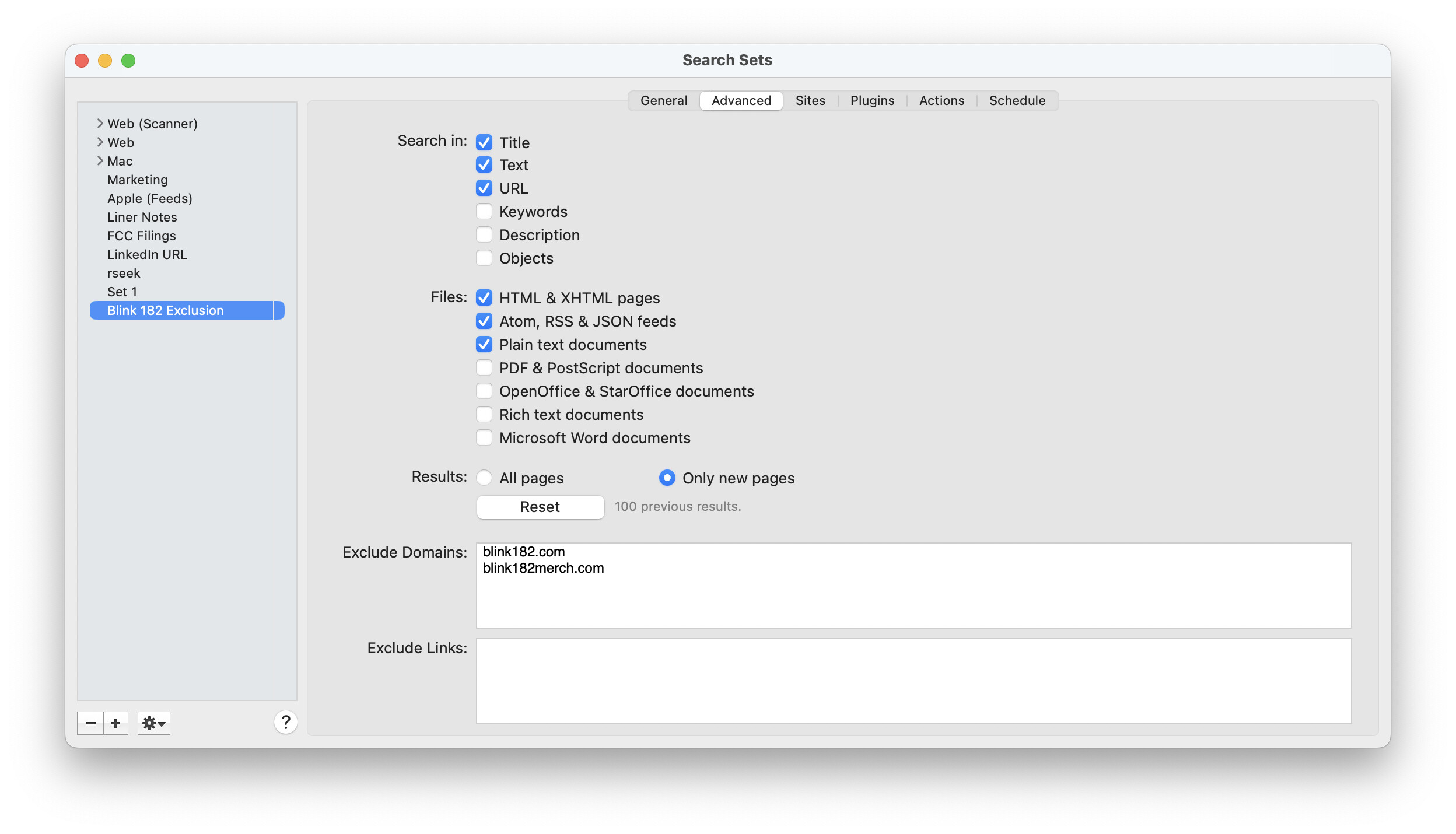

Isn’t this what you’re looking for?
---
### Author:  [@cornchip](https://discourse.devontechnologies.com/u/cornchip)
#### Post date: [February 17, 2023, 3:54pm UTC](https://discourse.devontechnologies.com/t/backlinks-search-question/74622/8 "2023-02-17T15:54:57Z")
Why does [blink182.com](http://blink182.com) appear in the list of results if the domain is excluded?
Also, why does setting a domain ([allmusic.com](http://allmusic.com), for example) in Sites not restrict the results to just that domain?
I’m asking because I tried the example with DA as well, and it seems odd to me that these exclusions and whitelists seemingly have no effect on the results list. Just looking to understand the product better.
---
### Author:  [@BLUEFROG](https://discourse.devontechnologies.com/u/BLUEFROG)
#### Post date: [February 17, 2023, 4:03pm UTC](https://discourse.devontechnologies.com/t/backlinks-search-question/74622/9 "2023-02-17T16:03:29Z")
The screen capture clearly shows the domain is **Excluded**.
> Also, why does setting a domain ([allmusic.com](http://allmusic.com/), for example) in Sites not restrict the results to just that domain?
Did you add a plugin in the **Plugins** tab of the search set?
---
### Author:  [@leehammond](https://discourse.devontechnologies.com/u/leehammond)
#### Post date: [February 17, 2023, 4:49pm UTC](https://discourse.devontechnologies.com/t/backlinks-search-question/74622/10 "2023-02-17T16:49:59Z")
@BLUEFROG,
That’s exactly how set up and it appeared to work.
To doublecheck the results I have filtered DAP results looking for [allmusic.com](http://allmusic.com) using the search bar on the upper right.
On the off chance that **[allmusic.com](http://allmusic.com)** isn’t within the first 1000 results I’ve
also searched the results for the presence of **[blink182merch.com](http://blink182merch.com)** which is the number 2 ranked result on Google.
I understand not wanting to compare DAP with Google but I can’t explain why a top-ranking search result in Google isn’t showing up in the DAP result set. Can you take look at the screenshots below and advise.


---
### Author:  [@BLUEFROG](https://discourse.devontechnologies.com/u/BLUEFROG)
#### Post date: [February 17, 2023, 5:06pm UTC](https://discourse.devontechnologies.com/t/backlinks-search-question/74622/11 "2023-02-17T17:06:05Z")
What are the **Settings** in the search?
---
### Author:  [@leehammond](https://discourse.devontechnologies.com/u/leehammond)
#### Post date: [February 17, 2023, 5:39pm UTC](https://discourse.devontechnologies.com/t/backlinks-search-question/74622/12 "2023-02-17T17:39:12Z")
If you mean the application wide settings I haven’t modified those from default. Screenshot here.
I am also uploading the Search Set I created for [Blink182.com](http://Blink182.com) example.
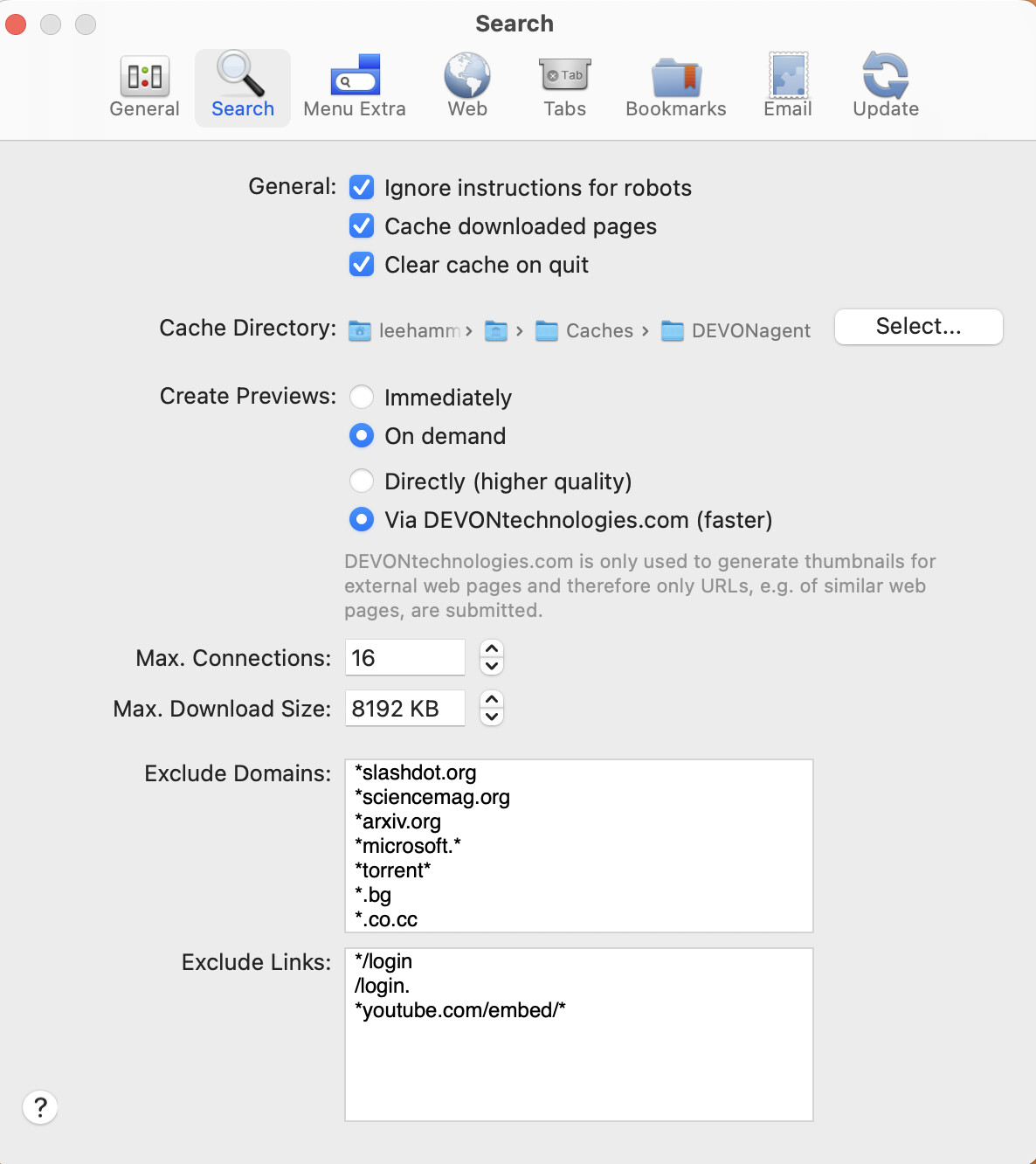
[blink182.com Backlinks 2.agentSet.zip](https://discourse.devontechnologies.com/uploads/short-url/dU1sSYUoTsvvYP8F9Bik20pdH1f.zip) (1.1 KB)
---
### Author:  [@BLUEFROG](https://discourse.devontechnologies.com/u/BLUEFROG)
#### Post date: [February 17, 2023, 9:01pm UTC](https://discourse.devontechnologies.com/t/backlinks-search-question/74622/13 "2023-02-17T21:01:10Z")
No. The Settings tab of the Ssearch you posted screen captures of.
---
### Author:  [@leehammond](https://discourse.devontechnologies.com/u/leehammond)
#### Post date: [February 17, 2023, 9:59pm UTC](https://discourse.devontechnologies.com/t/backlinks-search-question/74622/14 "2023-02-17T21:59:48Z")

---
### Author:  [@leehammond](https://discourse.devontechnologies.com/u/leehammond)
#### Post date: [February 17, 2023, 10:20pm UTC](https://discourse.devontechnologies.com/t/backlinks-search-question/74622/15 "2023-02-17T22:20:55Z")
@BLUEFROG,
I’ve found the issue. It is not DAP, it is Google.
It is showing results for pages like [allmusic.com](http://allmusic.com) which do not actually contain “[blink182.com](http://blink182.com)”
The way I figured this out was to wrap the search with quotes “[blink182.com](http://blink182.com)” and only from site:allmusic.com. With the quotes wrapped Google finally displays a the alert text:
\*_No results found for **“[blink182.com](http://blink182.com)” -site:blink182.com +site:allmusic.com**_ (see screenshot).
DAP on the other hand doesn’t show me any results that don’t contain [blink182.com](http://blink182.com) – exactly what I needed.
I think we can consider this issue closed. Thanks for all your help.

---
### Author:  [@leehammond](https://discourse.devontechnologies.com/u/leehammond)
#### Post date: [February 17, 2023, 10:24pm UTC](https://discourse.devontechnologies.com/t/backlinks-search-question/74622/16 "2023-02-17T22:24:43Z")
Here’s a article on quotes in Google – I knew to use quotes with collection of terms – “blink 182” but didn’t think it was necessary for a single term like [blink182.com](http://blink182.com)
> **[How we're improving search results when you use quotes](https://blog.google/products/search/how-were-improving-search-results-when-you-use-quotes/)**
>
> How snippets in Google’s search results are being improved by forming them around where quoted words or phrases occur in a web document.
---
### Author:  [@BLUEFROG](https://discourse.devontechnologies.com/u/BLUEFROG)
#### Post date: [February 18, 2023, 11:26am UTC](https://discourse.devontechnologies.com/t/backlinks-search-question/74622/17 "2023-02-18T11:26:47Z")
Thanks for the follow-up and link to the article. I wasn’t aware of these different quoting behaviors either. Learn something new, every day 🙂
---
### Author:  [@leehammond](https://discourse.devontechnologies.com/u/leehammond)
#### Post date: [February 18, 2023, 6:06pm UTC](https://discourse.devontechnologies.com/t/backlinks-search-question/74622/18 "2023-02-18T18:06:32Z")
I think the Google search plug-in that ships with DAP is broken or needs an update.
Any term I search using just the google plug-in shows 0 links in the log and no results.
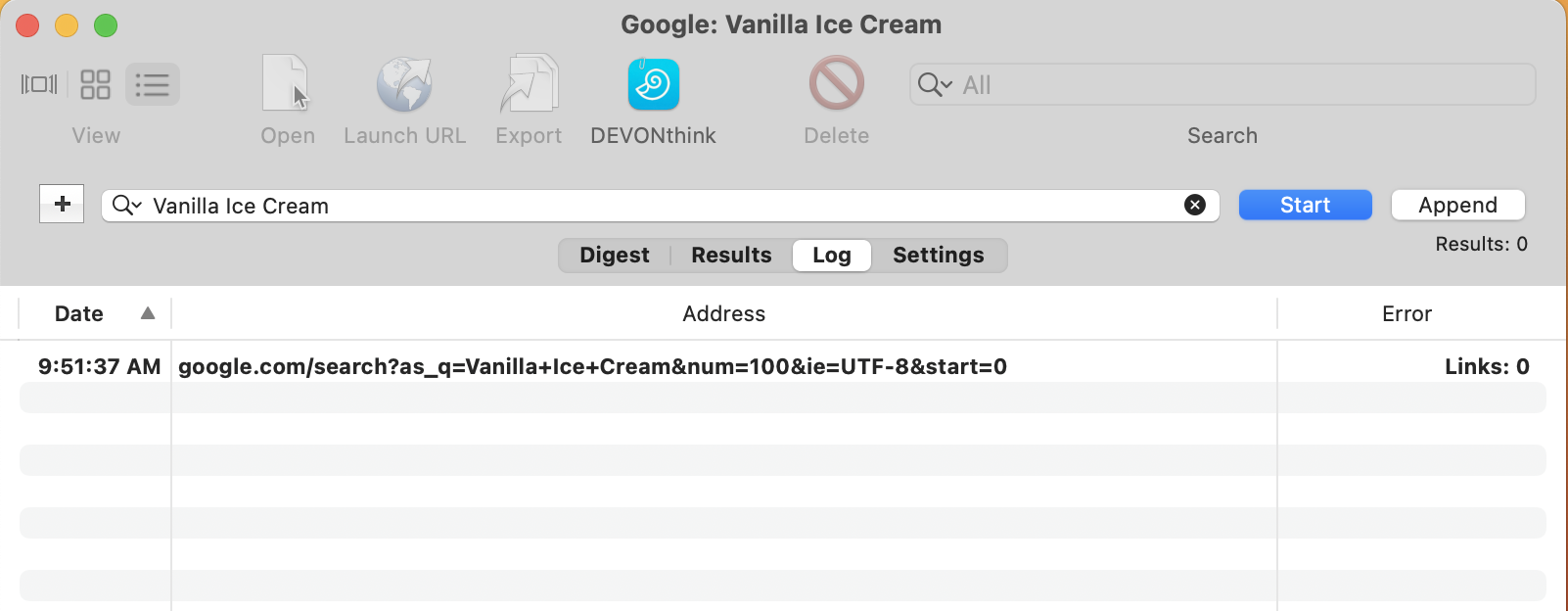
For comparison when I use Bing I see 28 of 30 links

Clicking on the URLs in the logs do confirm the presence of links in the search results.
[https://www.google.com/search?as\_q=Vanilla+Ice+Cream&num=100&ie=UTF-8&start=0](https://www.google.com/search?as_q=Vanilla+Ice+Cream&num=100&ie=UTF-8&start=0)
> **[Vanilla Ice Cream - Bing](https://www.bing.com/search?q=Vanilla%2BIce%2BCream&filt=all&first=1)**
>
> Intelligent search from Bing makes it easier to quickly find what you’re looking for and rewards you.
---
### Author:  [@cgrunenberg](https://discourse.devontechnologies.com/u/cgrunenberg)
#### Post date: [February 19, 2023, 7:50am UTC](https://discourse.devontechnologies.com/t/backlinks-search-question/74622/19 "2023-02-19T07:50:48Z")
> [@leehammond](#):
>
> I think the Google search plug-in that ships with DAP is broken or needs an update.
Maybe you’ve performed too many searches too fast and Google requires a captcha.
---
### Author:  [@leehammond](https://discourse.devontechnologies.com/u/leehammond)
#### Post date: [February 19, 2023, 3:56pm UTC](https://discourse.devontechnologies.com/t/backlinks-search-question/74622/20 "2023-02-19T15:56:18Z")
Your righ @cgrunenberg. I’m seeing results today that I wasn’t getting yesterday
**Today:**

**Yesterday:**

Thank you!
[Next page](https://discourse.devontechnologies.com/t/backlinks-search-question/74622.md?page=2)