# Batch Renaming w/ Sequence #
**URL:** https://discourse.devontechnologies.com/t/batch-renaming-w-sequence/66713
**Category:** DEVONthink
**Created:** [September 15, 2021, 3:09pm UTC](https://discourse.devontechnologies.com/t/batch-renaming-w-sequence/66713 "2021-09-15T15:09:22Z")
**Posts on this page:** 6
**Page:** 1
### Author:  [@romebot](https://discourse.devontechnologies.com/u/romebot)
#### Post date: [September 15, 2021, 3:09pm UTC](https://discourse.devontechnologies.com/t/batch-renaming-w-sequence/66713/1 "2021-09-15T15:09:22Z")
I’ve played around with the scripts and looked at a few forum posts, and it seems it’s not possible, though I’ve read there might be additional scripts I could install — still not sure, so wanted to double check.
What I want to do is rename a bunch of files w/ various, inconsistent file names to e.g.
Image\_1, Image\_2, Image\_3, etc., but all it seems one can do is replace existing text…
Can RegEx do this? If so, where do I learn how to do the above. I searched for RegEx in the handbook but didn’t find anything. I did find this, but seems a bit difficult to learn just for this purpose: [DEVONtechnologies | Rename Items Using RegEx](https://www.devontechnologies.com/blog/tiprenameitemsusingregex)
Thanks!
---
### Author:  [@BLUEFROG](https://discourse.devontechnologies.com/u/BLUEFROG)
#### Post date: [September 15, 2021, 3:18pm UTC](https://discourse.devontechnologies.com/t/batch-renaming-w-sequence/66713/2 "2021-09-15T15:18:51Z")
Trust me, you don’t _“just learn Regex”_. 😮
It is powerful and cool and frustrating and confusing, all in one.
Worth knowing some? I think so.
For the faint of heart? Nope.
You question depends on what you’re wanting to do over the long run.
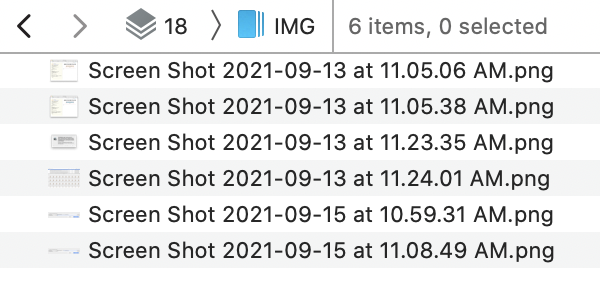
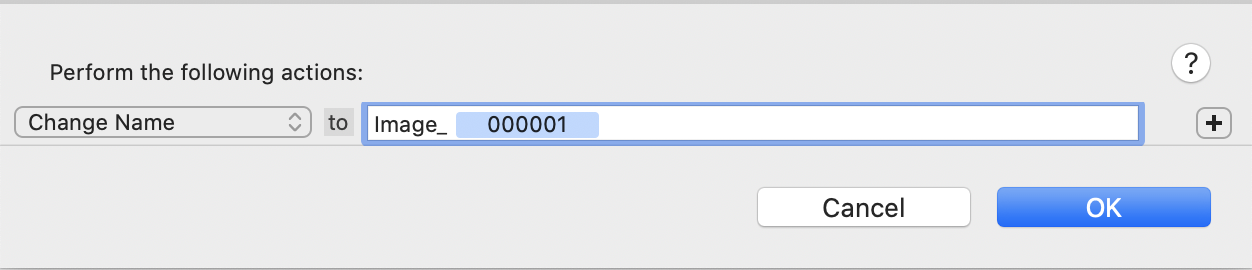
If this is just a group of images alone, you could select them all and run a **Tools \> Batch Process** with a **Counter** placeholder, like so…
### Originals
### Batch Process with Placeholder
### After batch processsing

However…
- No, you can’t set the counter to start at a specific number.
- Setting the specific number of digits requires using a hidden preference _(see **Documentation \> Help \> Appendix \> Hidden Preferences \> Counter Digits** )_/
---
### Author:  [@chrillek](https://discourse.devontechnologies.com/u/chrillek)
#### Post date: [September 15, 2021, 3:38pm UTC](https://discourse.devontechnologies.com/t/batch-renaming-w-sequence/66713/3 "2021-09-15T15:38:52Z")
> [@romebot](#):
>
> Can RegEx do this?
Regex by itself can’t increment a counter. You’d have to integrate it in a script. If you even _need_ a regex at all. Since you want to replace the complete existing filename with something completely new, @BLUEFROG’s way seems a lot more reasonable.
---
### Author:  [@romebot](https://discourse.devontechnologies.com/u/romebot)
#### Post date: [September 15, 2021, 8:10pm UTC](https://discourse.devontechnologies.com/t/batch-renaming-w-sequence/66713/4 "2021-09-15T20:10:49Z")
thanks @chrillek and @BLUEFROG — i think batch process w/ placeholder will do exactly what I need. I guess I could use a renaming app or even use lightroom, but doing quick stuff within the app is genius. while regex seems powerful, it’s a bit overkill and a bit above my pay grade at the moment. 🙂 cheers.
---
### Author:  [@BLUEFROG](https://discourse.devontechnologies.com/u/BLUEFROG)
#### Post date: [September 15, 2021, 8:24pm UTC](https://discourse.devontechnologies.com/t/batch-renaming-w-sequence/66713/5 "2021-09-15T20:24:44Z")
> [@romebot](#):
>
> I guess I could use a renaming app or even use lightroom
I’m not sure at what point you’d be thinking about these options but caution you without knowing more info.
And you’re welcome!
---
### Author:  [@romebot](https://discourse.devontechnologies.com/u/romebot)
#### Post date: [September 15, 2021, 8:38pm UTC](https://discourse.devontechnologies.com/t/batch-renaming-w-sequence/66713/6 "2021-09-15T20:38:57Z")
I guess I meant I could drag the files to a folder on the desktop and use a renaming app or lightroom to rename and then reimport to DT, but that’s too much work — your solution is great for my needs.