# Concatenate metadata to rename using AppleScript or smart rules
**URL:** https://discourse.devontechnologies.com/t/concatenate-metadata-to-rename-using-applescript-or-smart-rules/69847
**Category:** DEVONthink
**Tags:** automation
**Created:** [March 1, 2022, 11:12am UTC](https://discourse.devontechnologies.com/t/concatenate-metadata-to-rename-using-applescript-or-smart-rules/69847 "2022-03-01T11:12:12Z")
**Posts on this page:** 20
**Page:** 1
### Author:  [@olivenoire](https://discourse.devontechnologies.com/u/olivenoire)
#### Post date: [March 1, 2022, 11:12am UTC](https://discourse.devontechnologies.com/t/concatenate-metadata-to-rename-using-applescript-or-smart-rules/69847/1 "2022-03-01T11:12:13Z")
Hello,
In a previous [post](https://discourse.devontechnologies.com/t/rename-using-custom-data-for-human-being/69820/2) I’ve hardly learned how to rename a file using AppleScript and one metadata
But I need to rename a file using at least 3 metadata. And now I’m stuck to concatenate the 3 metadata

The aim of my project is to rename using automation and / or smartrule.
When metadata are filled then I can rename. It is btw a control method for archiving
Since I’ve discovered a web site about AppleScript (I have absolutely no background in software programming or whatsoever). I’ve discovered the dictionary for DT 3 but it is no help at all. Or I’ve learn there is some command and property. But I don’t know how it will help me

Some simple question :
- Is smart rule alone is able to do the job ? I’ve discovered smartrule can perform action
- Or I absolutely need an AppleScript (with or without a smartrule laughing my script) to rename?
Hope my request is clear since English is not my mother tongue
---
### Author:  [@cgrunenberg](https://discourse.devontechnologies.com/u/cgrunenberg)
#### Post date: [March 1, 2022, 11:14am UTC](https://discourse.devontechnologies.com/t/concatenate-metadata-to-rename-using-applescript-or-smart-rules/69847/2 "2022-03-01T11:14:36Z")
> [@olivenoire](#):
>
> Is smart rule alone is able to do the job ? I’ve discovered smartrule can perform action
A smart rule (like the one on the screenshot) should be able to handle this usually. What’s the desired format of the name?
---
### Author:  [@DTLow](https://discourse.devontechnologies.com/u/DTLow)
#### Post date: [March 1, 2022, 11:46am UTC](https://discourse.devontechnologies.com/t/concatenate-metadata-to-rename-using-applescript-or-smart-rules/69847/3 "2022-03-01T11:46:48Z")
> [@olivenoire](#):
>
> And now I’m stuck to concatenate the 3 metadata
Please provide
1. the id’s for each metada item
2. an example of the metadata content
3. an example of the new name
In your code example, you are using _selected records_
and a repeat loop with _thisRecord_
For this code example below, I’m using id’s _metadata1, metadata2, metadata3_
To retrieve custom metadata and concatenate, example code is
```auto
set MetaData1 to get custom meta data for "metadata1" from thisRecord default value "-"
set MetaData2 to get custom meta data for "metadata2" from thisRecord default value "-"
set MetaData3 to get custom meta data for "metadata3" from thisRecord default value "-"
set newName to MetaData1 & "-" & MetaData2 & "-" & Metadata3
```
(editied to include dashes between metadata items
---
### Author:  [@olivenoire](https://discourse.devontechnologies.com/u/olivenoire)
#### Post date: [March 1, 2022, 12:44pm UTC](https://discourse.devontechnologies.com/t/concatenate-metadata-to-rename-using-applescript-or-smart-rules/69847/4 "2022-03-01T12:44:07Z")
> [@cgrunenberg](#):
>
> A smart rule (like the one on the screenshot) should be able to handle this usually. What’s the desired format of the name?
Ty for reply.
The desired format would be (based on metadata) :
company - yyyymmdd (date\_du\_document) - object
based on this :


> [@DTLow](#):
>
> Please provide
>
> 1. the id’s for each metada item
> 2. an example of the metadata content
> 3. an example of the new name
Ty you again for reply
1. the id’s for each metada item
- Company id’s : company
- Date\_du\_document id’s : date
- Object id’s : objet
1. an example of the metadata content
company :
2. an example of the new name
I’m going to study your code example.
About date, I wonder if this is able to transform 2 juillet 2021 (jully 2th, 2021) in yyyymmdd format : 20210702
```auto
tell application id "DNtp"
set theRecords to (selected records)
repeat with thisRecord in theRecords
set vendorname to get custom meta data for "vendor" from thisRecord
set datestring to get custom meta data for "daterec" from thisRecord
set [_day, _month, _year] to [day, month, year] of datestring
set _month to _month * 1
set _month to texts -1 thru -2 of ("0" & _month)
set _day to texts -1 thru -2 of ("0" & _day)
set datename to {_year, _month, _day} as string
set transformedName to vendorname & "_" & datename
set name of thisRecord to transformedName
end repeat
end tell
```
---
### Author:  [@DTLow](https://discourse.devontechnologies.com/u/DTLow)
#### Post date: [March 1, 2022, 1:00pm UTC](https://discourse.devontechnologies.com/t/concatenate-metadata-to-rename-using-applescript-or-smart-rules/69847/5 "2022-03-01T13:00:19Z")
> [@olivenoire](#):
>
> About date, I wonder if this is able to transform 2 juillet 2021 (jully 2th, 2021) in yyyymmdd format : 20210702
Here’s an example of code I use to convert _current date_ to _yyyymmdd_
```auto
set {year:yyyy, month:mmm, day:d} to (current date)
set dd to ("0" & d as string)
set dd to (text -2 thru -1 of dd) as string
set m to mmm as integer
set mm to ("0" & m as string)
set mm to (text -2 thru -1 of mm) as string
set yyyymmdd to (yyyy as string) & mm & dd
```
---
### Author:  [@cgrunenberg](https://discourse.devontechnologies.com/u/cgrunenberg)
#### Post date: [March 1, 2022, 1:26pm UTC](https://discourse.devontechnologies.com/t/concatenate-metadata-to-rename-using-applescript-or-smart-rules/69847/6 "2022-03-01T13:26:18Z")
> [@olivenoire](#):
>
> The desired format would be (based on metadata) :
> company - yyyymmdd (date\_du\_document) - object
> based on this :
In this case a script is indeed required as the custom metadata date can’t be converted to the desired format (yet).
---
### Author:  [@olivenoire](https://discourse.devontechnologies.com/u/olivenoire)
#### Post date: [March 1, 2022, 1:49pm UTC](https://discourse.devontechnologies.com/t/concatenate-metadata-to-rename-using-applescript-or-smart-rules/69847/7 "2022-03-01T13:49:14Z")
OK thank you.
Will try to embed @DTLow informations in my script, and I thank you again, btw.
If I understand well, I can probably launch my script with smartrule 🙂
---
### Author:  [@BLUEFROG](https://discourse.devontechnologies.com/u/BLUEFROG)
#### Post date: [March 1, 2022, 3:21pm UTC](https://discourse.devontechnologies.com/t/concatenate-metadata-to-rename-using-applescript-or-smart-rules/69847/8 "2022-03-01T15:21:28Z")
What do you have set in **System Preferences \> Language & Region \> Advanced \> Dates \> Short**?
If you **always** wanted to use this format for short dates, you could change it here.

And a script showing the use of the `short date string` of a date string…

---
### Author:  [@olivenoire](https://discourse.devontechnologies.com/u/olivenoire)
#### Post date: [March 1, 2022, 3:35pm UTC](https://discourse.devontechnologies.com/t/concatenate-metadata-to-rename-using-applescript-or-smart-rules/69847/9 "2022-03-01T15:35:03Z")
Thank you for this reply.
I’m not sure I want to use the “short” format anytime or at least, I don’t now when Iit is used at an another time / other app.
Thank you for the script. I will try to embed all of this in a global script.
BTW, I’ve discover some strange behavior about date :
If I manually input 22/3/22 instead of 22/2/2022 (or 22/03/2022) for 22 march 2022, the month “3” becomes “03” and march
But the year 22 does not becomes 2022 but stay 22.
And finally modified columns is in format dd/mm/yyyy but the metadata column “Date\_du\_document” is in format dd mmmm. yyyy

---
### Author:  [@BLUEFROG](https://discourse.devontechnologies.com/u/BLUEFROG)
#### Post date: [March 1, 2022, 3:37pm UTC](https://discourse.devontechnologies.com/t/concatenate-metadata-to-rename-using-applescript-or-smart-rules/69847/10 "2022-03-01T15:37:18Z")
You’re welcome.
Development would have to respond regarding the formatting supported in columns and the inspectors. They’re not the same controls.
---
### Author:  [@cgrunenberg](https://discourse.devontechnologies.com/u/cgrunenberg)
#### Post date: [March 1, 2022, 3:42pm UTC](https://discourse.devontechnologies.com/t/concatenate-metadata-to-rename-using-applescript-or-smart-rules/69847/11 "2022-03-01T15:42:46Z")
> [@olivenoire](#):
>
> If I manually input 22/3/22 instead of 22/2/2022 (or 22/03/2022) for 22 march 2022, the month “3” becomes “03” and march
> But the year 22 does not becomes 2022 but stay 22.
Entering the year 22 is indeed possible.
> [@olivenoire](#):
>
> And finally modified columns is in format dd/mm/yyyy but the metadata column “Date\_du\_document” is in format dd mmmm. yyyy
I’m not seeing this over here. Did you customize the date formats in system preferences?
---
### Author:  [@olivenoire](https://discourse.devontechnologies.com/u/olivenoire)
#### Post date: [March 1, 2022, 4:02pm UTC](https://discourse.devontechnologies.com/t/concatenate-metadata-to-rename-using-applescript-or-smart-rules/69847/12 "2022-03-01T16:02:19Z")
> [@cgrunenberg](#):
>
> Entering the year 22 is indeed possible.
Yes, now I understand. Maybe it can be improved but now I know
> [@cgrunenberg](#):
>
> I’m not seeing this over here. Did you customize the date formats in system preferences?
No I haven’t. I don’t even know this possibility before you point this.
But I’ve tried and what happened :

and now:

---
### Author:  [@olivenoire](https://discourse.devontechnologies.com/u/olivenoire)
#### Post date: [March 2, 2022, 7:04pm UTC](https://discourse.devontechnologies.com/t/concatenate-metadata-to-rename-using-applescript-or-smart-rules/69847/13 "2022-03-02T19:04:46Z")
> [@DTLow](#):
>
> In your code example, you are using _selected records_
> and a repeat loop with _thisRecord_
Is it a problem? I’m using the previous code.
> [@DTLow](#):
>
> For this code example below, I’m using id’s _metadata1, metadata2, metadata3_
Is it a different way or complimentary way?
Before adapt my code to use “date\_metadata” I would like to concatenate 2 simple metadata, but actually the code does work :
```auto
-- Rename records based on Custom Meta Data
tell application id "DNtp"
try
set theRecords to selected records
if theRecords = {} then error "Please select some records"
repeat with thisRecord in theRecords
set thisRecord_CustomMetaData to custom meta data of thisRecord
try
set Metadata1 to get custom meta data for mdcompany from thisRecord default value "-"
set Metadata2 to get custom meta data for mdobjet from thisRecord default value "-"
set newName to Metadata1 & " - " & Metadata2
set name of thisRecord to thisRecord_CustomMetaData_Value
end try
end repeat
on error error_message number error_number
if the error_number is not -128 then display alert "DEVONthink" message error_message as warning
return
end try
end tell
```
---
### Author:  [@chrillek](https://discourse.devontechnologies.com/u/chrillek)
#### Post date: [March 2, 2022, 7:25pm UTC](https://discourse.devontechnologies.com/t/concatenate-metadata-to-rename-using-applescript-or-smart-rules/69847/14 "2022-03-02T19:25:48Z")
> [@olivenoire](#):
>
> but actually the code does work :
Does it? I’m not sure that I understand what you want to achieve, but from looking at the code, I doubt that it does anything sensible at all.
I _suppose_ that you want to change the name of your record to `newName`. But you _do_ instead set it to `thisRecord_CustomMetaData_Value`, which is not even defined.
BTW: I’m not a big fan of theseterriblylongvariablenames that differ only in the last five characters. It is too easy to take `thisRecord_CustomMetaData` to be the same as `thisRecord_CustomMetaData_Value`,
# Taking a step back
I don’t mean to be impolite, but I have the impression that you’re trying out things left and right without really understanding what’s happening. I would suggest that you try to solve your problem as much as possible _without_ AppleScript first. Right now, you’re in way over your head (again, not wanting to be rude, just stating the obvious). Try to start slow and simple, solving _one_ problem at a time.
Like: Get a _single_ custom meta data value from the current record and add it to the record’s name.
Then, maybe: Try to figure out how this whole date business works (no, I have no idea in that context - AppleScript does weird things with dates, and I don’t know that language well enough). Get a custom meta data field’s value and transform it into the string value you want. Or, for that matter, take the record’s creation date or modification date or any other date already associated with the record.
Try getting some experience with smaller pieces of code that do _one_ thing and make sure that you understand what and why it is happening. Then, if all these small pieces of code work, put them together to get the big, shiny script that you’re looking for.
---
### Author:  [@olivenoire](https://discourse.devontechnologies.com/u/olivenoire)
#### Post date: [March 2, 2022, 9:49pm UTC](https://discourse.devontechnologies.com/t/concatenate-metadata-to-rename-using-applescript-or-smart-rules/69847/15 "2022-03-02T21:49:37Z")
Hi
Tanks for answer.
You are right. I simply want to rename a file using metadata.
I don’t know how to use smart rules this way.
I absolutely don’t know (sadly nor have time to learn) what is AppleScript and what it is for.
I absolutely not understand this strange (for me). but probably powerful language.
I have 0 knowledge in coding.
My aim is to use 3 simple metadata and to rename the file using them.
Somebody thankfully gave me a code for one metada. It works. But now I want to go further and finalise my project. I mean use 3 metadata, concatened them and use this as a name.
And I’m stuck.
What I find Crasy is I’m able to rename files using metadata with capture one pro (photo), receipts (invoice management) but not on DEVONthink. Really weird.
Obviously I have to resign. Nobody want / can / is able to help before I show I’ve spent hundred hours to learn something I will never ever use again.
---
### Author:  [@stephenjw](https://discourse.devontechnologies.com/u/stephenjw)
#### Post date: [March 2, 2022, 10:00pm UTC](https://discourse.devontechnologies.com/t/concatenate-metadata-to-rename-using-applescript-or-smart-rules/69847/16 "2022-03-02T22:00:26Z")
Hi @olivenoire - can’t you just use a Smart Rule?
eg something like:

Or have I missed your point? 🙂
---
### Author:  [@olivenoire](https://discourse.devontechnologies.com/u/olivenoire)
#### Post date: [March 2, 2022, 10:22pm UTC](https://discourse.devontechnologies.com/t/concatenate-metadata-to-rename-using-applescript-or-smart-rules/69847/17 "2022-03-02T22:22:49Z")
!!!
You are right.
I don’t know why some people send me to such a complex task with AppleScript 🙂
About your solution : I don’t even know it is possible to right click in this dialog box.
Really a good thing to read this application is able to edit name using metadata and smart rule without coding

But it does not work. When I selective file and launch the rule, nothing happen.
Maybe I need to find an another way to launch the smart rule.

Edit: I will find and write a comprehensive thread to help people which don’t want nor have time to learn coding 😛
---
### Author:  [@stephenjw](https://discourse.devontechnologies.com/u/stephenjw)
#### Post date: [March 2, 2022, 10:45pm UTC](https://discourse.devontechnologies.com/t/concatenate-metadata-to-rename-using-applescript-or-smart-rules/69847/18 "2022-03-02T22:45:48Z")
> [@olivenoire](#):
>
> it is possible to right click in this dialog box
Yes - that’s the trick. 😃
Maybe the rule is not triggering for some reason - I see you’ve set it to activate “On Demand”. Have you tried dragging and dropping a file onto the smart rule icon?
---
### Author:  [@BLUEFROG](https://discourse.devontechnologies.com/u/BLUEFROG)
#### Post date: [March 2, 2022, 11:51pm UTC](https://discourse.devontechnologies.com/t/concatenate-metadata-to-rename-using-applescript-or-smart-rules/69847/19 "2022-03-02T23:51:13Z")
@stephenjw has given good advice here.
There’s nothing wrong with scripting, even integrating scripts in a smart rule, but DEVONthink’s smart rules are made to be accessible to non-programmers as well as the tech-savvier crowd.
Also, as he also pointed out, the rule’s event trigger is set to **On demand** by default. This is a safety measure. You can leave it at that and drag and drop files onto the smart rule in the Navigate sidebar or use **Tools \> Apply Rule** with a selected file. Otherwise, you’d have to determine if there’s an event trigger that could be used instead. I suggest you stay with the safe route at this time.
Also… this is **not** a good idea……

You have done well to target a specific database but you should be setting up criteria to match, e.g., **Kind is PDF/PS** and **Date Added is Today** , etc. This will keep the rule from incorrectly matching and acting on too many files.
---
### Author:  [@olivenoire](https://discourse.devontechnologies.com/u/olivenoire)
#### Post date: [March 3, 2022, 8:22am UTC](https://discourse.devontechnologies.com/t/concatenate-metadata-to-rename-using-applescript-or-smart-rules/69847/20 "2022-03-03T08:22:06Z")
> [@stephenjw](#):
>
> Maybe the rule is not triggering for some reason - I see you’ve set it to activate “On Demand”. Have you tried dragging and dropping a file onto the smart rule icon?
I probably need to define some rules to trigger the smart rule : if the 3 metadata exist then rename the file and put a green flag.
What I see is right clic on a file and select the rule does not trigger the smart rule. D’n’d with on the smart rule trigger it
> [@BLUEFROG](#):
>
> There’s nothing wrong with scripting, even integrating scripts in a smart rule, but DEVONthink’s smart rules are made to be accessible to non-programmers as well as the tech-savvier crowd.
I understand all the power of script but when we need it, we have generally no time to learn it. For me with zero knowledge it is like Chinese. 🙂
> [@BLUEFROG](#):
>
> the rule’s event trigger is set to **On demand** by default.
That’s fine for me, till I decide the conditions that’s trigger
> [@BLUEFROG](#):
>
> drag and drop files onto the smart rule in the Navigate sidebar or use **Tools \> Apply Rule** with a selected file. Otherwise
In fact **Tools \> Apply Rule** does not work. Same for right click. Does not work either.
> [@BLUEFROG](#):
>
> Also… this is **not** a good idea……
I’m trying to create a condition but it does not works. Actually I want a manual launch of the rule but it trigger only if “company”, “date” and “object” exist.

About the date :
I had to create a manual yyyymmdd metadata because when using date it does not allow to choose the output format I want yyyymmdd but dd/mm/yyyy. Maybe I need to modify the system setting
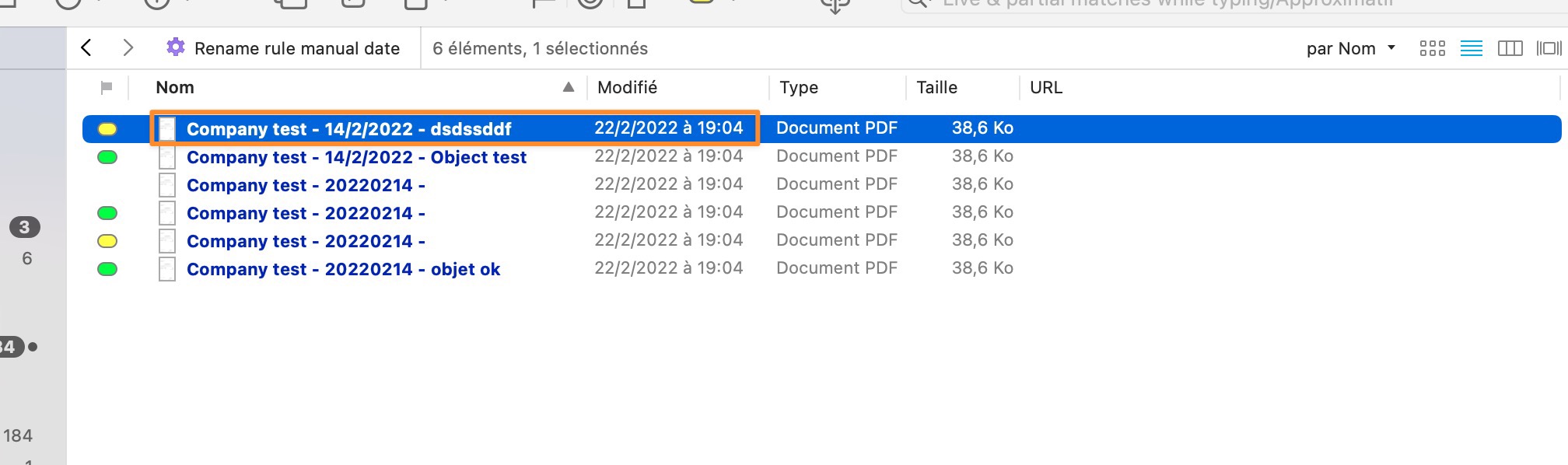
Finally I can see there is a “document date” and a yyyy-mm-dd format but I can’t see how to populate this?

[Next page](https://discourse.devontechnologies.com/t/concatenate-metadata-to-rename-using-applescript-or-smart-rules/69847.md?page=2)