# Does Print to DevonThink exist?
**URL:** https://discourse.devontechnologies.com/t/does-print-to-devonthink-exist/64392
**Category:** DEVONthink
**Created:** [May 10, 2021, 8:48am UTC](https://discourse.devontechnologies.com/t/does-print-to-devonthink-exist/64392 "2021-05-10T08:48:50Z")
**Posts on this page:** 12
**Page:** 1
### Author:  [@stolzy](https://discourse.devontechnologies.com/u/stolzy)
#### Post date: [May 10, 2021, 8:48am UTC](https://discourse.devontechnologies.com/t/does-print-to-devonthink-exist/64392/1 "2021-05-10T08:48:50Z")
It would be really handy to be able to print directly from an application to DevonThink, much in the way I can print to Kindle.
Is there a sensible easy way to do this. Seems an obvious thing to want to do.
---
### Author:  [@Stephen\_C](https://discourse.devontechnologies.com/u/Stephen_C)
#### Post date: [May 10, 2021, 9:06am UTC](https://discourse.devontechnologies.com/t/does-print-to-devonthink-exist/64392/2 "2021-05-10T09:06:17Z")
See, for example, page 77 of the excellent [user guide](https://www.devontechnologies.com/support/download/extras) (also available via in app help):
> **Printing to your database** : To “print” (save) a document to DEVONthink as a PDF, open it in its creator application (this could even be DEVONthink itself). Then, do the following:…
I have not quoted the entire section because it’s well worth reading the guide (or help) itself.
Stephen
---
### Author:  [@Blanc](https://discourse.devontechnologies.com/u/Blanc)
#### Post date: [May 10, 2021, 3:58pm UTC](https://discourse.devontechnologies.com/t/does-print-to-devonthink-exist/64392/4 "2021-05-10T15:58:32Z")
…and when you’ve read up and set up, [here’s a tip from Jim to make things even quicker](https://discourse.devontechnologies.com/t/shortcut-for-print-pdf-to-dtpo/22974/8).
---
### Author:  [@stolzy](https://discourse.devontechnologies.com/u/stolzy)
#### Post date: [May 11, 2021, 8:25am UTC](https://discourse.devontechnologies.com/t/does-print-to-devonthink-exist/64392/5 "2021-05-11T08:25:49Z")
OK, thanks I was clearly looking in the wrong place. All good 👍
---
### Author:  [@stolzy](https://discourse.devontechnologies.com/u/stolzy)
#### Post date: [May 11, 2021, 12:05pm UTC](https://discourse.devontechnologies.com/t/does-print-to-devonthink-exist/64392/6 "2021-05-11T12:05:02Z")
Except that works in some applications (preview for example), but not others (Chrome).
Pity there isn’t a consistent way to download pdfs to DT
---
### Author:  [@rmschne](https://discourse.devontechnologies.com/u/rmschne)
#### Post date: [May 11, 2021, 1:24pm UTC](https://discourse.devontechnologies.com/t/does-print-to-devonthink-exist/64392/7 "2021-05-11T13:24:18Z")
> [@stolzy](#):
>
> Pity there isn’t a consistent way to download pdfs to DT
How about in the browser, display the PDF then use the browser’s save command to save to DEVONthink’s Global Inbox. I do that all the time so I do not see the lack of consistency you report.
---
### Author:  [@rpallred](https://discourse.devontechnologies.com/u/rpallred)
#### Post date: [May 11, 2021, 1:38pm UTC](https://discourse.devontechnologies.com/t/does-print-to-devonthink-exist/64392/8 "2021-05-11T13:38:43Z")
> [@stolzy](#):
>
> but not others (Chrome)
Chrome bypasses the system print dialog on both Windows and macOS (ARGH!). Simply click `more settings` in the Chrome print pane:
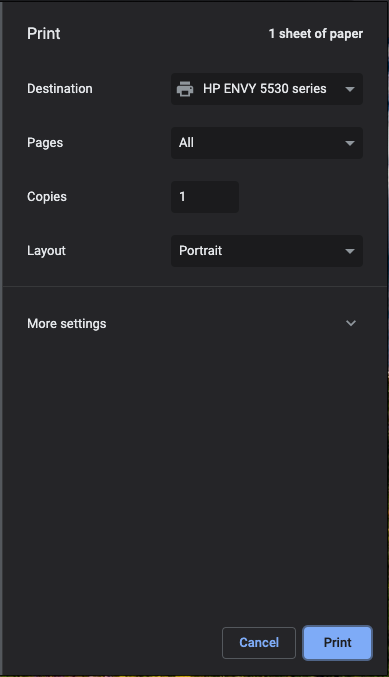
Scroll down and select the correct option:

Which will give you the system print dialogue with the print to DEVONthink options. Or it has a special keyboard shortcut for the correct print dialogue…
EDIT: clarity; changed screen shot.
---
### Author:  [@stolzy](https://discourse.devontechnologies.com/u/stolzy)
#### Post date: [May 11, 2021, 1:59pm UTC](https://discourse.devontechnologies.com/t/does-print-to-devonthink-exist/64392/9 "2021-05-11T13:59:51Z")
Thanks for that, but ‘More Settings\>Print’ option doesn’t exist in the settings on my version of Chrome on Mac OS X
---
### Author:  [@rpallred](https://discourse.devontechnologies.com/u/rpallred)
#### Post date: [May 11, 2021, 2:57pm UTC](https://discourse.devontechnologies.com/t/does-print-to-devonthink-exist/64392/10 "2021-05-11T14:57:28Z")
Sorry, I realized I was less clear than I should have been–updated my post to reflect that the `more settings` option is in the Chrome print pane (Chrome 90.0.4430.212; macOS 10.15.7), not in settings.
---
### Author:  [@stolzy](https://discourse.devontechnologies.com/u/stolzy)
#### Post date: [May 11, 2021, 4:14pm UTC](https://discourse.devontechnologies.com/t/does-print-to-devonthink-exist/64392/11 "2021-05-11T16:14:38Z")
OK, thanks. All clear now.
---
### Author:  [@MFDoom](https://discourse.devontechnologies.com/u/MFDoom)
#### Post date: [May 11, 2021, 9:06pm UTC](https://discourse.devontechnologies.com/t/does-print-to-devonthink-exist/64392/12 "2021-05-11T21:06:20Z")
If you are on Big Sur and on the latest version of DEVONthink you need to use this as the menu title “Save PDF to DEVONthink 3”
---
### Author:  [@Kalico](https://discourse.devontechnologies.com/u/Kalico)
#### Post date: [October 27, 2021, 9:47pm UTC](https://discourse.devontechnologies.com/t/does-print-to-devonthink-exist/64392/13 "2021-10-27T21:47:33Z")
My “Print to DEVONthink” was missing too…had to install the add-ons then in was there. In the menu… DEVONthink 3\>\> Install Add-ons