# DT 4.4 on macOS 27: Fails once to OCR with Internal Program Error
**URL:** https://discourse.devontechnologies.com/t/dt-4-4-on-macos-27-fails-once-to-ocr-with-internal-program-error/87682
**Category:** Feedback
**Created:** [September 21, 2026, 7:56am UTC](https://discourse.devontechnologies.com/t/dt-4-4-on-macos-27-fails-once-to-ocr-with-internal-program-error/87682 "2026-09-21T07:56:52Z")
**Posts on this page:** 3
**Page:** 1
### Author:  [@chrillek](https://discourse.devontechnologies.com/u/chrillek)
#### Post date: [September 21, 2026, 7:56am UTC](https://discourse.devontechnologies.com/t/dt-4-4-on-macos-27-fails-once-to-ocr-with-internal-program-error/87682/1 "2026-09-21T07:56:52Z")
I have
- an indexed folder on a NAS
- a smart rule that watches this folder and converts incoming PDFs to PDF+Text with DT’s OCR
- this worked flawlessly with DT4.3 and macOS 26.x
Now, I see this in the DT protocol, but only once (see below for follow-up)
```plaintext
21.09.26, 09:48:20: Unable to create an OCR document
21.09.26, 09:48:20: Texterkennung von 'Scan_20260920_153242_000786' fehlgeschlagen.
21.09.26, 09:48:20: Internal program error:
/Users/build/Build/TFS.Agent/_work/1/s/ROOT/FREngine/FREngine/src/FRDocument.cpp, 605.
```
Looks a bit weird to me, since I certainly never created a User named `build` on this machine, and there’s no `build` directory in my `/Users`.
Running OCR directly on the file works ok, BTW. So, here’s my smart rule:
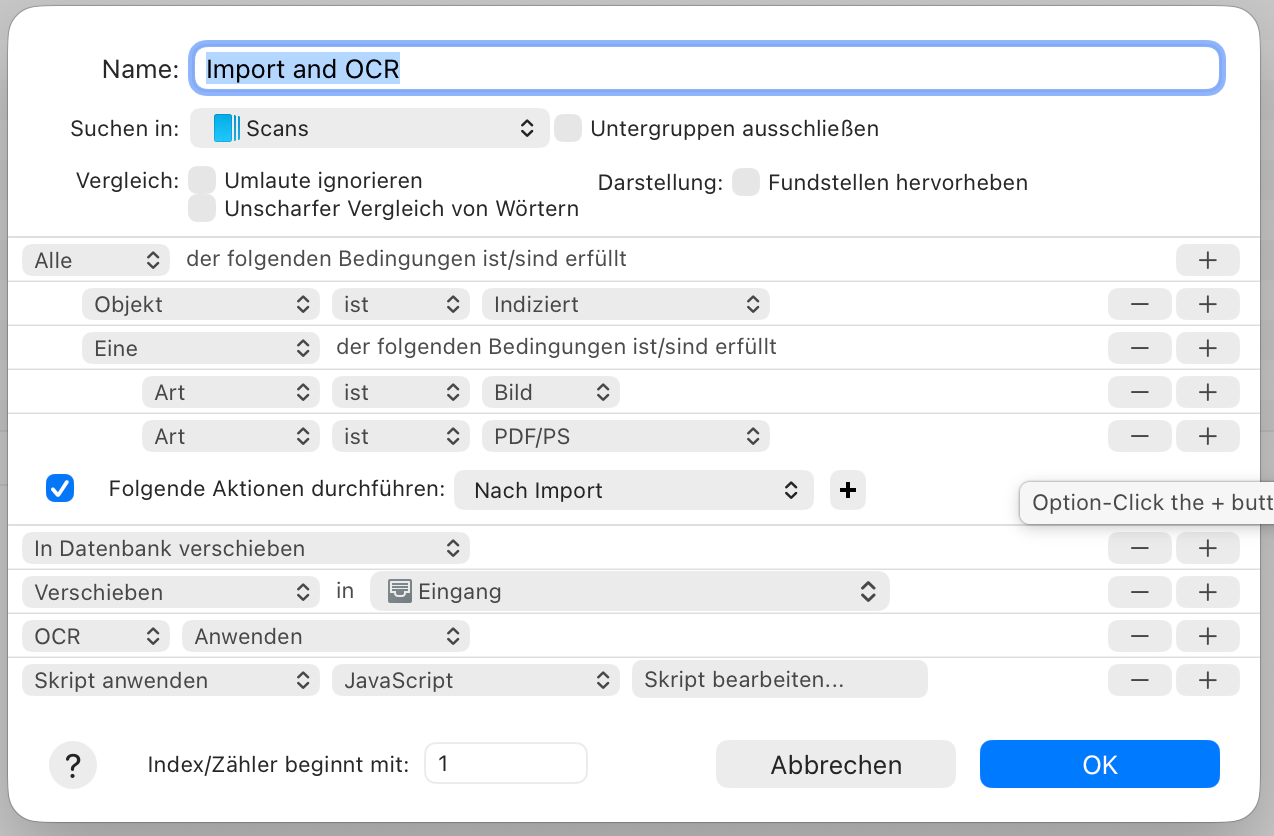
The script at the end only removes empty pages from the OCR’d PDF. It did never run in this situation.
Now I moved the original document back from the trash into the indexed folder and run the rule directly on it – no problem whatsoever.
And I found out that `FREngine` is a part of Abbyy’s OCR engine that relies on Rosetta. Which is on it’s way out of macOS…
---
### Author:  [@aedwards](https://discourse.devontechnologies.com/u/aedwards)
#### Post date: [September 21, 2026, 8:31am UTC](https://discourse.devontechnologies.com/t/dt-4-4-on-macos-27-fails-once-to-ocr-with-internal-program-error/87682/2 "2026-09-21T08:31:21Z")
If FREngine is showing as using Rosetta then you have an old Intel version of the OCR installed. Try the following:
- Quit DEVONthink
- In Finder select the menu Go-\>Go to Folder and enter the line below before pressing Go.
~/Library/Application Support/DEVONthink/Abbyy
- Select the file DTOCRHelper and drag to the trash
- Open DEVONthink, select the menu DEVONthink-\>Install Add-Ons
- Select ABBYY FineReader OCR and press install.
This should install the Apple Silicon version. Any problems let me know.
---
### Author:  [@chrillek](https://discourse.devontechnologies.com/u/chrillek)
#### Post date: [September 21, 2026, 11:53am UTC](https://discourse.devontechnologies.com/t/dt-4-4-on-macos-27-fails-once-to-ocr-with-internal-program-error/87682/3 "2026-09-21T11:53:32Z")
I followed your advice and will let you know if the issue arises again. Thanks!