# How do I extract Annotations into separate RTF files
**URL:** https://discourse.devontechnologies.com/t/how-do-i-extract-annotations-into-separate-rtf-files/70649
**Category:** DEVONthink
**Created:** [April 21, 2022, 5:46pm UTC](https://discourse.devontechnologies.com/t/how-do-i-extract-annotations-into-separate-rtf-files/70649 "2022-04-21T17:46:03Z")
**Posts on this page:** 16
**Page:** 1
### Author:  [@jpottsx1](https://discourse.devontechnologies.com/u/jpottsx1)
#### Post date: [April 21, 2022, 5:46pm UTC](https://discourse.devontechnologies.com/t/how-do-i-extract-annotations-into-separate-rtf-files/70649/1 "2022-04-21T17:46:04Z")
My research is made up of plowing through a pile of PDF’s and highlighting useful thoughts. I then copy each one manually to an RTF file to create an Atomic Note/Zettle. I then drop them into Scrivener where I can reorder each of the Atomic Note/Zettle into the proper order for the paper I’m writing.
I understand that I can sumerize a PDF’s highlights and obtain an RTF containing all of the anotations in one document, but is there a way to obtain an export where each annotation is its own RTF document?
Thanks
---
### Author:  [@suavito](https://discourse.devontechnologies.com/u/suavito)
#### Post date: [April 21, 2022, 6:30pm UTC](https://discourse.devontechnologies.com/t/how-do-i-extract-annotations-into-separate-rtf-files/70649/2 "2022-04-21T18:30:53Z")
At first I would strongly recommend to not `Summarize Highlights` as RTF but as Markdown.
Yes, being a _Scrivener_ user myself I know it’s a rich text app. But it is really good at importing Markdown too! Just use _Scrivener’s_ `Import and Split` function and make sure that `Split and structure using Markdown headings in the text` is ticked as well as `Convert Markdown`.
Then you will get a Markdown document with each annotation as a sub-document.
If these sub-documents are looking like you want them to look… well. My guess would be: no. And they won’t contain no link to the PDF no more. But this is what you get with the standard functions of both apps. For everything more specific a script might help.
EDIT: When you search for “extract annotations” in theses forum you will find other approaches. To my own surprise—and if I didn’t oversee anything—just not yet **the** solution.
PS: You didn’t ask for it but I’d like to add another reason for skipping RTF instead of Markdown: Footnotes in Markdown notes will be transformed to _Scrivener_ footnotes (inline/random footnotes into inline footnotes and the ones at the end of a document into Inspector footnotes). Since Apple did not properly implement Footnotes in its Text Engine _Scrivener_ it won’t work with RTF.
---
### Author:  [@suavito](https://discourse.devontechnologies.com/u/suavito)
#### Post date: [April 21, 2022, 7:14pm UTC](https://discourse.devontechnologies.com/t/how-do-i-extract-annotations-into-separate-rtf-files/70649/3 "2022-04-21T19:14:33Z")
Not a reply actually but a question to the DEVONtechnicians:
I briefly looked into the source Markdown created by `Summarize Highlights` and it did not look to complicated to further process. But when I used `Summarize Highlights` again I got a different output! I don’t know what I did but here are the results:
## Links to lines:
```auto
# [Untersuchung gegen Johnson](x-devonthink-item://71CEFD6F-00BE-49AB-92C3-A6F834F00549)
## [Line 4](x-devonthink-item://71CEFD6F-00BE-49AB-92C3-A6F834F00549?line=3)
* {==Der britische Premierminister Boris Johnson muss sich wegen mutmaßlicher Lügen im Zusammenhang mit der "Partygate"-Affäre einer Untersuchung durch den zuständigen Ausschuss im Unterhaus stellen.==}
## [Line 7](x-devonthink-item://71CEFD6F-00BE-49AB-92C3-A6F834F00549?line=6)
* {==Einige seiner Parteikollegen forderten sogar seinen Rücktritt. Diesen hatte der Premier, der zu Besuch in Indien war, jedoch umgehend zurückgewiesen. "Ich glaube nicht, dass es das Richtige ist", sagte er in einem Interview mit dem==}
## [Line 10](x-devonthink-item://71CEFD6F-00BE-49AB-92C3-A6F834F00549?line=9)
* {==Nachrichtensender Sky News,==}
## [Line 13](x-devonthink-item://71CEFD6F-00BE-49AB-92C3-A6F834F00549?line=12)
* {==Johnson stellt sich nun auf den Standpunkt, er habe nicht gemerkt, dass es sich um Partys handelte.==}
```
## Links to pages:
```auto
# [Untersuchung gegen Johnson](x-devonthink-item://551B2F15-C23A-471B-BC65-B2BAF3D753C1)
## [Page 1](x-devonthink-item://551B2F15-C23A-471B-BC65-B2BAF3D753C1?page=0)
* {==Der britische Premierminister Boris Johnson muss sich wegen mutmaßlicher Lügen im Zusammenhang mit der "Partygate"-Affäre einer Untersuchung durch den zuständigen Ausschuss im Unterhaus stellen.==}
* {==Einige seiner Parteikollegen forderten sogar seinen Rücktritt. Diesen hatte der Premier, der zu Besuch in Indien war, jedoch umgehend zurückgewiesen. "Ich glaube nicht, dass es das Richtige ist", sagte er in einem Interview mit dem Nachrichtensender Sky News,==}
## [Page 2](x-devonthink-item://551B2F15-C23A-471B-BC65-B2BAF3D753C1?page=1)
* {==Johnson stellt sich nun auf den Standpunkt, er habe nicht gemerkt, dass es sich um Partys handelte.==}
* {==Später stellte sich heraus, dass der Premier selbst an mehreren der fraglichen Zusammenkünfte teilgenommen hatte.==}
```
And both PDFs were created the same way: By `Save as DEVONthink 3` from _Safari_ and both PDFs had two pages.
For a script it is important to know what causes what because each needs a specific chopping.
(Could I by accident, stupidity or just plain fatigue have summerized the RTF summary instead of the PDF? I will look into it after a good night of sleep.)
---
### Author:  [@KevinCoates](https://discourse.devontechnologies.com/u/KevinCoates)
#### Post date: [April 22, 2022, 12:30pm UTC](https://discourse.devontechnologies.com/t/how-do-i-extract-annotations-into-separate-rtf-files/70649/4 "2022-04-22T12:30:22Z")
Hi
This has been discussed on other threads (just letting you know, not at all criticising your question !)
> [@Annotations - multiple separate files for a single source document?](https://discourse.devontechnologies.com/t/annotations-multiple-separate-files-for-a-single-source-document/70077):
>
> Hi all - I can’t figure out how to do something that seems like it should be simple. The ideal workflow would be: I read a book I create a single “Source” notecard for the book in Devonthink, with publisher, title, etc for bibliography and citations Every time I want to take a note on something in the book, I create a separate and new “Annotation”-style file that links back to the Source notecard. I can then organize the dozens of different notes I’ve made on the book in separate DevonThink …
> [@Looking for some workflow ideas](https://discourse.devontechnologies.com/t/looking-for-some-workflow-ideas/70558):
>
> Hey Devonthink Crowd. New user here getting more familiar with the features and am really seeing some potential with the progressive summarization techniques. Here’s what I’m currently wanting to do and looking for ‘how best would you handle this’. Import a long form document and / or transcript as a PDF+Text. (Potentially label as 'Source-Unreviewed) Review PDF and Highlight with highlighter any key elements. Export Highlights to another document. (I love this, because it links to the s…
I’m pretty sure there are more threads than this, but this is what my search found.
FWIW my preferred approach is to use the ($) app [Highlights](https://apps.apple.com/gb/app/highlights-pdf-reader-notes/id1498912833) (App Store link) which has a one click export of PDF annotations to a DevonThink folder of separate markdown files.
---
### Author:  [@MichiganUser](https://discourse.devontechnologies.com/u/MichiganUser)
#### Post date: [April 22, 2022, 2:23pm UTC](https://discourse.devontechnologies.com/t/how-do-i-extract-annotations-into-separate-rtf-files/70649/5 "2022-04-22T14:23:42Z")
I have now been able to get that Note on Source script to work for DevonThink3 after some help with tweaking the script from other people. For the OP, you can [download that script here](https://muninn.net/blog/2010/08/revisting-the-note-taking-problem-with-devonthink/index.html):
Then paste this tweaked script into the “main” file in the Scripts folder after you open package contents:
```auto
-- Smart template adding a localized annotation for a shown document
-- Written by Eric Böhnisch-Volkmann, modified by Christian Grunenberg
-- © 2009 DEVONtechnologies, LLC
-- Modified by Konrad M. Lawson http://muninn.net/
--K: Thanks to Eric and everyone on the DEVON team for creating this wonderful software and a rich set of scripts to learn from
-- The non-localized default name of the new quote
property pTemplateName : "Note"
property pAnnotationsGroup : "/Notes"
-- Format the date for the title of the note
set this_date to (the year of the (current date) as string) & "." & (the month of the (current date) as number as string) & "." & (the day of the (current date) as string) & " " & the time string of the (current date)
-- Import helper library
tell application "Finder" to set pathToAdditions to ((path to application id "DNtp" as string) & "Contents:Resources:Template Script Additions.scpt") as alias
set helperLibrary to load script pathToAdditions
try
tell application id "DNtp"
-- If a document was frontmost when activating the smart template get its item link
set theFrontmostDocument to content record
set theFrontmostWindow to think window 1
if (theFrontmostDocument is missing value) then error my helperLibrary's localizedString("No document shown. Please select a document, then try again.")
set theFrontmostDocumentURL to ("x-devonthink-item://" & uuid of theFrontmostDocument) as string
set theFrontmostDocumentName to name of theFrontmostDocument as string
-- Add page parameter if a current page attribute is available for this record
if the current page of theFrontmostWindow ≠ -1 then
set theFrontmostDocumentURL to theFrontmostDocumentURL & "?page=" & ((the current page of theFrontmostWindow) as string)
end if
-- Create the Notes group, if necessary
-- set theAnnotationsGroupRecord to create location (my helperLibrary's localizedString(pAnnotationsGroup))
-- if theAnnotationsGroupRecord is missing value then error my helperLibrary's localizedString("Could not create the 'Notes' group.")
-- Import the predefined document
set theTemplateFiles to helperLibrary's pathToLocalizedResources() & ((my helperLibrary's localizedString(pTemplateName) & ".rtf") as string)
set theRecord to import theTemplateFiles placeholders {|%documentName%|:theFrontmostDocumentName, |%documentLink%|:{|URL|:theFrontmostDocumentURL, |name|:my helperLibrary's localizedString("Source")}} to current group
-- Before this was imported to theAnnotationsGroupRecord but now to the current group
-- Adjust name of the document
set the name of theRecord to this_date & ": " & theFrontmostDocumentName
-- Set the tags of the note to the tags of the original overview document.
set the tags of theRecord to the tags of theFrontmostDocument
-- Finally, add the note's item link to the annotated document's URL field if possible
-- K: I don't understand what this is doing other than creating a link reference for only the first note that is added.
--If there is more than one note on a source, it still links to the first note so this doesn't seem very useful:
if URL of theFrontmostDocument ≠ "" then
set theComment to comment of theFrontmostDocument
if theComment ≠ "" then set theComment to theComment & return
set theComment to theComment & my helperLibrary's localizedString("Original URL") & ": " & (URL of theFrontmostDocument)
set comment of theFrontmostDocument to theComment
else
set URL of theFrontmostDocument to ("x-devonthink-item://" & uuid of theRecord) as string
end if
-- K: I would prefer for a tab to be opened but I can't figure out how to get the tab to be displayed
-- in front of the currently displaying record, rather than behind it
-- open tab for record theRecord in think window 1
open window for record theRecord
end tell
on error errMsg number errNum
display alert (localized string "An error occured when adding the annotation.") message errMsg as warning
end try
```
---
### Author:  [@MichiganUser](https://discourse.devontechnologies.com/u/MichiganUser)
#### Post date: [April 22, 2022, 2:26pm UTC](https://discourse.devontechnologies.com/t/how-do-i-extract-annotations-into-separate-rtf-files/70649/6 "2022-04-22T14:26:12Z")
and, @KevinCoates KevinCoates, that Highlights app looks promising. Two questions if you don’t mind:
1. How would you compare it as a note-taking app to other PDF readers (PDF Expert, etc)?
2. When you export the files, can you do a naming convention automatically, or does all the “fit it to my database titles” work have to happen within Devonthink?
Thanks for flagging it!
---
### Author:  [@MichiganUser](https://discourse.devontechnologies.com/u/MichiganUser)
#### Post date: [April 22, 2022, 3:27pm UTC](https://discourse.devontechnologies.com/t/how-do-i-extract-annotations-into-separate-rtf-files/70649/8 "2022-04-22T15:27:56Z")
Cool! I want to emphasize that I am absolutely not a tech person. The tweaks I made to the script were in response to helpful responses to an earlier thread, and specifically [based on this post](https://discourse.devontechnologies.com/t/note-taking-note-on-source-script/53765/9). (It’s useful to read the other posts for context, but this is the key one.)
It took me a bit of trial and error to get it working per the other posters’ instructions, but once I got it set up, it’s worked fine in DT3
---
### Author:  [@jpottsx1](https://discourse.devontechnologies.com/u/jpottsx1)
#### Post date: [April 22, 2022, 3:37pm UTC](https://discourse.devontechnologies.com/t/how-do-i-extract-annotations-into-separate-rtf-files/70649/9 "2022-04-22T15:37:20Z")
Is there code that I can use to automatically insert the selected text from the main document into the body of the note?
---
### Author:  [@MichiganUser](https://discourse.devontechnologies.com/u/MichiganUser)
#### Post date: [April 22, 2022, 3:51pm UTC](https://discourse.devontechnologies.com/t/how-do-i-extract-annotations-into-separate-rtf-files/70649/10 "2022-04-22T15:51:07Z")
i bet it’s possible but i have no idea how to do it : (
---
### Author:  [@jpottsx1](https://discourse.devontechnologies.com/u/jpottsx1)
#### Post date: [April 22, 2022, 3:54pm UTC](https://discourse.devontechnologies.com/t/how-do-i-extract-annotations-into-separate-rtf-files/70649/11 "2022-04-22T15:54:11Z")
When you run the script, is it not supposed to create a group into which the new notes are saved? Its not happening for me.
---
### Author:  [@MichiganUser](https://discourse.devontechnologies.com/u/MichiganUser)
#### Post date: [April 22, 2022, 3:54pm UTC](https://discourse.devontechnologies.com/t/how-do-i-extract-annotations-into-separate-rtf-files/70649/12 "2022-04-22T15:54:51Z")
Oh! One other thing. I had to change the hotkey combination because control-command-M is the “move” command in DT3 and it wouldn’t be overridden. It turns out the way to do this is in the title of the script, which includes the keys you press. (kind of cool)
I renamed the file [not including extension] “\_Note on Source\_\_\_Shift-Cmd-Ctrl-M”, so i use shift-command-control-M to call it
---
### Author:  [@MichiganUser](https://discourse.devontechnologies.com/u/MichiganUser)
#### Post date: [April 22, 2022, 4:00pm UTC](https://discourse.devontechnologies.com/t/how-do-i-extract-annotations-into-separate-rtf-files/70649/13 "2022-04-22T16:00:04Z")
The [blog post](https://muninn.net/blog/2010/08/revisting-the-note-taking-problem-with-devonthink/index.html) has a detailed description of the workflow. Once you’re used to it, it’s a cinch.
1. Create a new group in your sources folder in Devonthink. Title that group precisely what you want to title the source, whatever your naming conventions are.
2. Open the new group and _inside_ the new group, create a new RTF. Title that new RTF precisely the exact name as the group name.
3. Inside the RTF, enter all bibliographical information. The RTF then becomes like your “hub” which all notes link back to
4. For each _new_ note you want to make, go to the RTF file you made and use the “Note on Source” hotkey. That will automatically generate a new notecard (new rtf file) following the template in the Note on Source script. The new notecard will be located in the Group for that source, at the same level as the “hub” RTF
I find the script works best if I call it from within the folder view.
---
### Author:  [@MichiganUser](https://discourse.devontechnologies.com/u/MichiganUser)
#### Post date: [April 22, 2022, 4:07pm UTC](https://discourse.devontechnologies.com/t/how-do-i-extract-annotations-into-separate-rtf-files/70649/14 "2022-04-22T16:07:11Z")
screen shots may help
First picture is an shot of Step 1 - I’ve created a new group for a new source and titled it “Fake Group”

The next two are action shots of Step 2
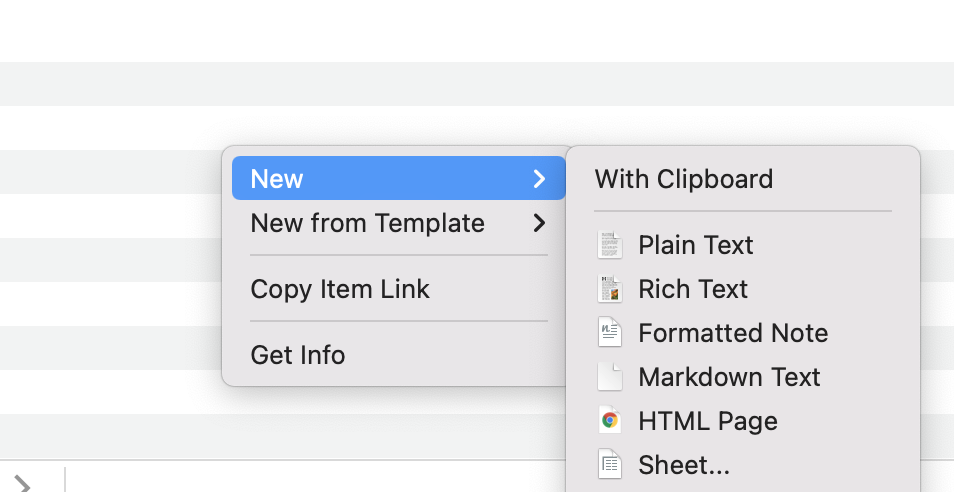

Here’s an action shot of step 3

And here’s what it looks like AFTER step 4, when I’ve called the “Note on Source Script” while highlighting the RTF file created at step 3 called “THIS IS A FAKE GROUP”
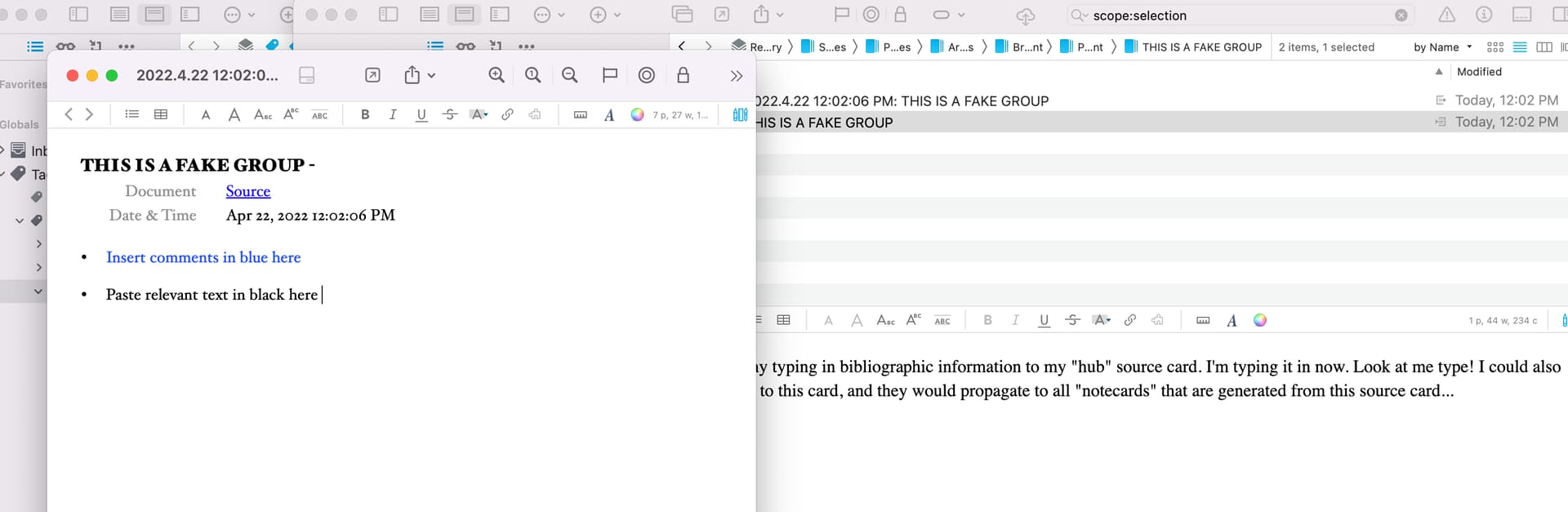
Note that you can change the template that is generated by “Note on Source”–what you see in my last screen shot is the result of my tinkering with the template, which can be found by using “Show Package Contents” on the script in the finder, then navigating to Contents/Resources/en.lproj/Note.rtf

EDIT: I’ve got to sign off for a while and may not think to loop back here soon, so apologies for any delays in further responses!
---
### Author:  [@KevinCoates](https://discourse.devontechnologies.com/u/KevinCoates)
#### Post date: [April 23, 2022, 8:42am UTC](https://discourse.devontechnologies.com/t/how-do-i-extract-annotations-into-separate-rtf-files/70649/15 "2022-04-23T08:42:36Z")
On 1. My note-taking needs are quite limited - highlights and the occasional note. For that it’s absolutely fine for my needs. The free version should allow you to test the functions that you need. Exporting to DTP - and lots of other functionality - comes with an in-app payment.
On 2.There are limited customisation options - see screenshots from preferences below.
The first shows how you can customise the content of the exported note:
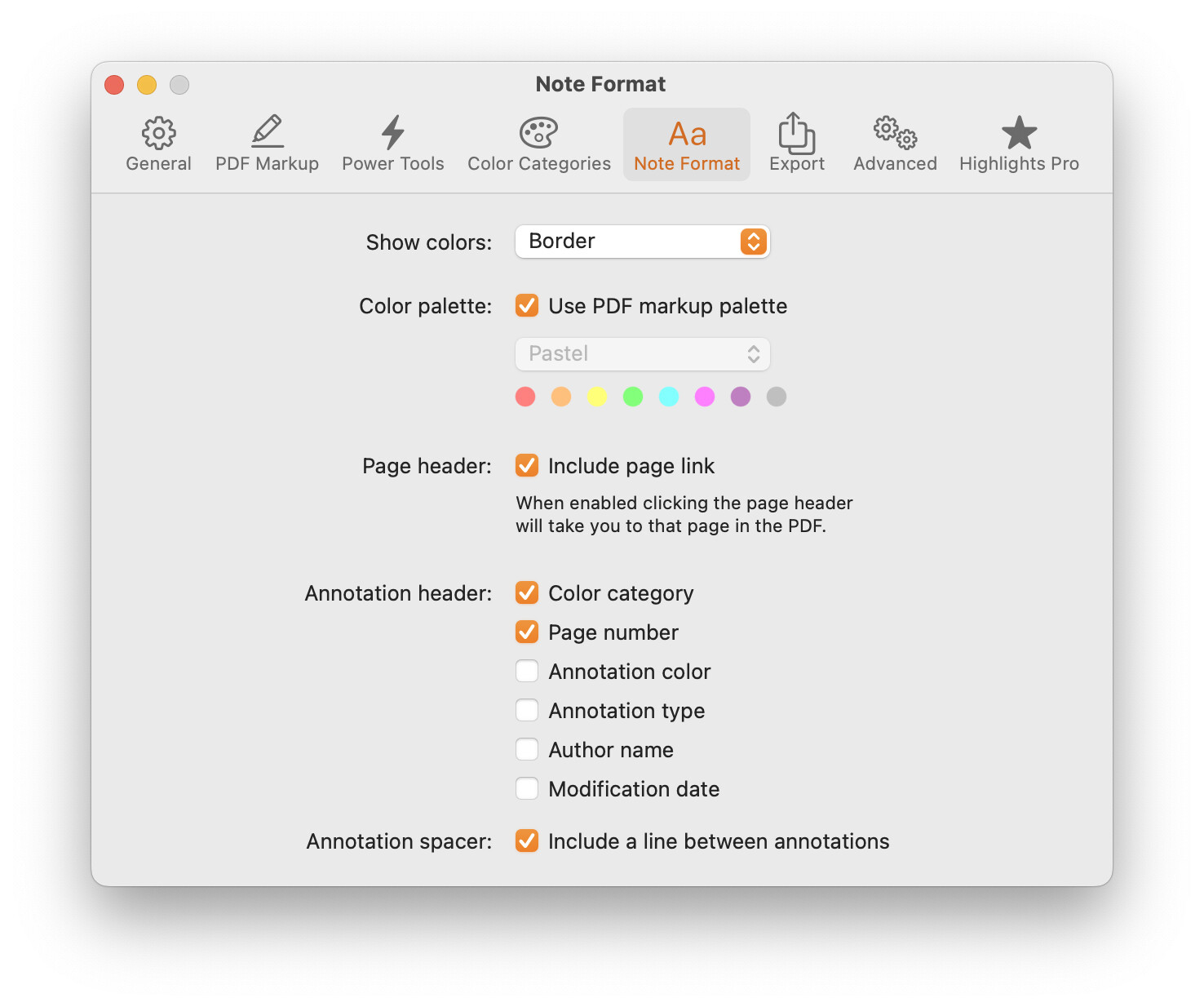
And this one shows you how to customise the exported file(s) themselves.The “File Naming” option gives you either the Document Name or the Metadata title. (I usually rename them once in DTP.)

Hope this helps.
---
### Author:  [@jpottsx1](https://discourse.devontechnologies.com/u/jpottsx1)
#### Post date: [April 23, 2022, 2:32pm UTC](https://discourse.devontechnologies.com/t/how-do-i-extract-annotations-into-separate-rtf-files/70649/16 "2022-04-23T14:32:59Z")
Thanks for the mini tutorial, great work. I finally got it working and now better understand the workflow.
I do find it a little awkward however, as a workflow and its not without some unexpected limitations.
- Invoking the SmartNote when reviewing a PDF from within a window does not save the note within the notes group, bit rather sends it directly to the Global Inbox. However the script does place the SmartNote in the Group when you are reviewing a document from within the Preview window.
- Creating a SmartNote does not pick up Highlighted selection of text from the PDF being reviewed.
As I’m not an AppleScript programmer, my ability to make modifications is severely limited. Any insights or help would be greatly appreciated.
---
### Author:  [@system](https://discourse.devontechnologies.com/u/system)
#### Post date: [April 22, 2025, 2:33pm UTC](https://discourse.devontechnologies.com/t/how-do-i-extract-annotations-into-separate-rtf-files/70649/17 "2025-04-22T14:33:36Z")
This topic was automatically closed 1095 days after the last reply. New replies are no longer allowed.