Do you macOS 26.x Tahoe? I notice scrollbar issues frequently in various apps - e.g. DEVONthink, TextEdit, Messages or Claude.
Just tried that on my Sequoia 15.7.3 – no issues. So perhaps it’s more Tahoe than DT?
Yep, thanks both! @chrillek @cgrunenberg I’m on Tahoe 26.5
I’ll try and see what happens in other apps (including iA Writer, and other md editors)
Couldn’t reproduce the issue in any other app, with the contents of an md that is having them in DT edit mode (TextEdit, iA Writer, Marked 2, MarkEdit)
And the issue persists no matter what settings I change for DT md - changing Preview, toggling on/off Extensions, using other style sheets.
It is a bit annoying, and forces me to edit the md’s in iA Writer…
1 Like
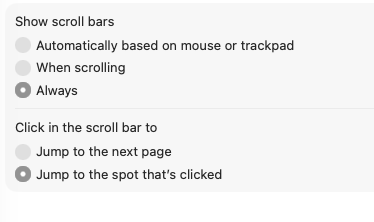
Does it persist after rebooting the computer and just opening the Markdown document but without changing any settings? If that’s the case - what’s your setting for scrollbars in the system settings (e.g. automatic or always)?
And which Markdown font do you use? A zipped sample document would be helpful, thank you.
@cgrunenberg Well, I did restart the Mac (M1) and it fixed the problem - at least for now.
So I’m guessing it might come back as a result of something in the way the Mac scrollbar works (or doesn’t quite  )
)
I’ll keep an eye to see if the issue comes back.
Christian, many thanks - but let me ask you (as a guy always eager to learn) - what did get reset when I restarted the mac?
Cheers,
Mike
That’s a question for Tahoe’s developers. Unfortunately macOS 26.x is one of the weaker releases in recent years (slow, buggy, inconsistent). macOS 27 can only get better 
2 Likes
Hey, many thanks! - yes, 27! 
And I can confirm that the bug is still there in 4.3.1. Had a nasty (but revertible) moment just now where I scrubbed all the document links in a file through some thoughtless clipboarding in WYSIWYG view.
What exactly did you do?
Same as above – ran a TextSoap macro on a Markdown document with WYWIWYG links checked. TextSoap copies the selection to clipboard, runs a series of regexes, and pastes the result back over the selection. But just copying and pasting into a plain-text file has the same effect: links are stripped out and only the visible text is preserved. Pasting into a .md file in DT does preserve the links, as does pasting into Ulysses, but pasting into iA Writer doesn’t.
Why not use Settings > Editing > General > Smart quotes?
In case of plain text this is actually intended. But copying & pasting inside or between Markdown documents in DEVONthink should retain the links & images.
Yes, I’m aware of that option (and other points in the Prefs hierarchy where smartening is available), but prefer to smarten quotes manually at the point where I need to turn the document into something less readily mungeable for export. In this morning’s case I wasn’t actually smartening quotes but performing a custom munge to abet my own workflow, quam marginis exiguitas non caperet.
I see the logic, and that is indeed the behaviour within DT (and Ulysses is evidently on board). But I’d argue that WYSIWYG for links and images should be treated as a display rather than a content option, so that copied text should retain the verbose formatting regardless of what’s displayed in DT’s editing view. That said, I had a use case the other day where stripping out the links was exactly what I needed to do for a Markdown export, and the DT clipboard behaviour was simpler than fiddling with a regex.
Hi,
Enabling Syntax highlighting of markdown text still prevents me from scrolling to the end of a markdown file.
Version: 4.3.2, Build fa65a6841309bd811d41a98ec1deb21c1dd79309/kawhih33il2i4 [11]
macOS: Version 26.5.1 (Build 25F80)
/anders
This problem of the text springing back at the bottom of .md pages has been a constant for me to the point that I usually edit with IA Writer, though I would prefer to edit with DTP. Your comment about the scrollbar system settings prompted me to review those settings. I made 2 changes: Selected "click in the selected bar to…Jump to the next page’, and deselected “use inertia when scrolling” in the Pointer Control. So far, I think that this solved the problem.
4 Likes
Thanks everyone for the ideas! I was about to create a Feature Request to fix this issue, but unchecking “Syntax highlighting” in Settings > Files > Markdown (I include the path for solution seekers who find this thread) seems to enable scrolling to the bottom of the Source pane.
I don’t understand why that particular choice would fix what might be a bad interaction between Tahoe scrolling and DT, but I’m really glad for the workaround!!!