# Need some help creating a "Move Here" script
**URL:** https://discourse.devontechnologies.com/t/need-some-help-creating-a-move-here-script/86575
**Category:** Automation
**Created:** [March 15, 2026, 12:12pm UTC](https://discourse.devontechnologies.com/t/need-some-help-creating-a-move-here-script/86575 "2026-03-15T12:12:14Z")
**Posts on this page:** 20
**Page:** 1
### Author:  [@uimike](https://discourse.devontechnologies.com/u/uimike)
#### Post date: [March 15, 2026, 12:12pm UTC](https://discourse.devontechnologies.com/t/need-some-help-creating-a-move-here-script/86575/1 "2026-03-15T12:12:14Z")
Can be Applescript or jxa (cause I listen to you all @chrillek @cgrunenberg @BLUEFROG@troejgaard and more) 🙂
[can be KM as well, or whatever!]
So the scenario is this:
I opened group “A”, and the window is displaying its contents, say a few groups, records.
I knew I had just taken a screenshot, or added something to the global inbox - and I wanted to move that into group “A”. But it could have been a record or group somewhere else.
Not knowing any better, today I just open a new window and navigate to Inbox, and drag it into “A”
But there has to be some other way of doing this - pulling rather than pushing.
Any ideas? - thanks!
---
### Author:  [@fredap](https://discourse.devontechnologies.com/u/fredap)
#### Post date: [March 15, 2026, 12:59pm UTC](https://discourse.devontechnologies.com/t/need-some-help-creating-a-move-here-script/86575/2 "2026-03-15T12:59:04Z")
> [@uimike](#):
>
> But there has to be some other way of doing this - pulling rather than pushing.
If you would like to have an automation do that for you, you have to somehow provide the missing information, i.e. the name of the document? How precise does it have to be? Would you be using tags? etc.
---
### Author:  [@uimike](https://discourse.devontechnologies.com/u/uimike)
#### Post date: [March 15, 2026, 1:15pm UTC](https://discourse.devontechnologies.com/t/need-some-help-creating-a-move-here-script/86575/3 "2026-03-15T13:15:59Z")
fred, I was thinking of something like launching a (the?) sorter that allowed me to navigate, potentially search, and move the selected record into “A”. Maybe something like this already exists and I’m just missing it.
I wouldn’t want to have to specify the record name, or tags - just navigate to it knowing where it’s supposed to be.
---
### Author:  [@saltlane](https://discourse.devontechnologies.com/u/saltlane)
#### Post date: [March 15, 2026, 1:26pm UTC](https://discourse.devontechnologies.com/t/need-some-help-creating-a-move-here-script/86575/4 "2026-03-15T13:26:40Z")
Have you tried CTRL-CMD-M when viewing the record to be moved. It is the move popup and you can then type/search for the destination easily. I use it all the time.
---
### Author:  [@troejgaard](https://discourse.devontechnologies.com/u/troejgaard)
#### Post date: [March 15, 2026, 1:31pm UTC](https://discourse.devontechnologies.com/t/need-some-help-creating-a-move-here-script/86575/5 "2026-03-15T13:31:30Z")
> [@uimike](#):
>
> I knew I had just taken a screenshot, or added something to the global inbox - and I wanted to move that into group “A”. **But it could have been a record or group somewhere else.**
Could the record you want to move be in a location other than the global inbox? Or are we only talking about the global inbox for this scenario? It’s not entirely clear to me.
* * *
Like @saltlane I also use the _Move To_ popover all the time. Another tip is that you can tear off the _Go To_ popover and use it as a drag & drop target for moving items.
---
### Author:  [@uimike](https://discourse.devontechnologies.com/u/uimike)
#### Post date: [March 15, 2026, 1:39pm UTC](https://discourse.devontechnologies.com/t/need-some-help-creating-a-move-here-script/86575/6 "2026-03-15T13:39:54Z")
I want to pull, not push, a record. I will be inside group “A” and want to bring into it a record or group that lies somewhere else.
---
### Author:  [@uimike](https://discourse.devontechnologies.com/u/uimike)
#### Post date: [March 15, 2026, 1:41pm UTC](https://discourse.devontechnologies.com/t/need-some-help-creating-a-move-here-script/86575/7 "2026-03-15T13:41:26Z")
troej, the record could be somewhere else. As I responded to saltlane, I want to pull a record, not push a record (via Move To). But I’ll try the popover.
[Edit] - the Go To… popover doesn’t let me see records, only groups
---
### Author:  [@troejgaard](https://discourse.devontechnologies.com/u/troejgaard)
#### Post date: [March 15, 2026, 1:51pm UTC](https://discourse.devontechnologies.com/t/need-some-help-creating-a-move-here-script/86575/8 "2026-03-15T13:51:48Z")
Yeah, I got what you meant with “pull” 🙂 The _Go To_ popover is “push” – I just mentioned it because saltlane brought up the _Move To_ popover, which you can’t tear off in the same way. In case this situation arises from a lack of screen real estate.
I’m pondering how to approach it. Basically we want to get the most recently added item across all databases, then “pull” that? Will the time it was added always be fairly recent?
---
### Author:  [@rkaplan](https://discourse.devontechnologies.com/u/rkaplan)
#### Post date: [March 15, 2026, 1:52pm UTC](https://discourse.devontechnologies.com/t/need-some-help-creating-a-move-here-script/86575/9 "2026-03-15T13:52:01Z")
I have a Smart Group which I call “Recently Revised.”
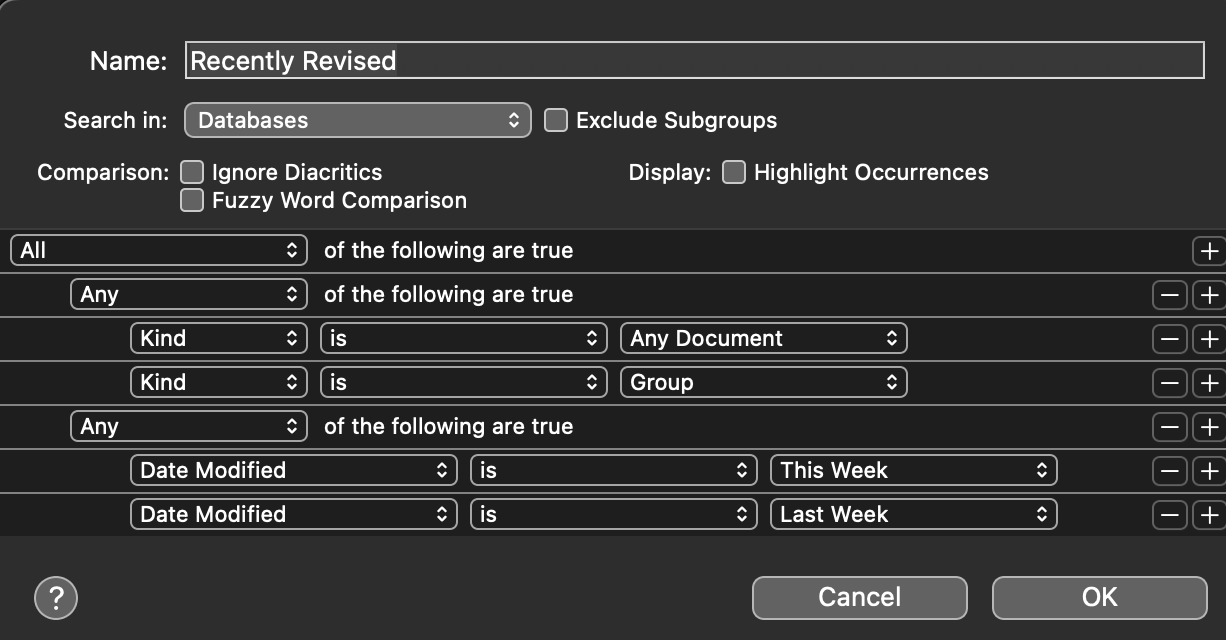
This Smart Group is always open in a specific Space on my Mac.
If I want to “Push” or “Pull” something I recently worked with, I go to that Smart group and right-click on the item. It lets me Move it to a Recent location, a Favorite location, or a location I search for.
---
### Author:  [@uimike](https://discourse.devontechnologies.com/u/uimike)
#### Post date: [March 15, 2026, 2:09pm UTC](https://discourse.devontechnologies.com/t/need-some-help-creating-a-move-here-script/86575/10 "2026-03-15T14:09:14Z")
The time added (of the record to be “pulled”) doesn’t really matter that much.
So here’s the scenario again:
I’m, say, doing some cleanup in my databases and groups, and looking inside a group “A” somewhere - and I know I had some records that I would like to bring here as well, maybe from the inbox, maybe from some other locations or even databases (that are open).
This happens to me very frequently - as I have a couple of dozen databases, with millions of records - for everything in my life… The databases have been carefully curated over the last 15 years, in terms of what they contain (e.g., “PHOTOGRAPHY”) - but I could have saved, years ago, receipts from cameras or lenses, in some other database.
Yeah, I could “push” - but “pulling” is more natural when I’m consolidating “A”
---
### Author:  [@uimike](https://discourse.devontechnologies.com/u/uimike)
#### Post date: [March 15, 2026, 2:12pm UTC](https://discourse.devontechnologies.com/t/need-some-help-creating-a-move-here-script/86575/11 "2026-03-15T14:12:17Z")
Thanks rkaplan!
But the “Date Modified” criteria are not very relevant to me - what I want is to be able to launch some window or popup, and pick an open database, group, record, to BRING into the group I have been working in. None of the Go To, Move To seem to work like this for me, and they (I believe) don’t show individual records anyways…
But I do like your example!
---
### Author:  [@troejgaard](https://discourse.devontechnologies.com/u/troejgaard)
#### Post date: [March 15, 2026, 2:19pm UTC](https://discourse.devontechnologies.com/t/need-some-help-creating-a-move-here-script/86575/12 "2026-03-15T14:19:24Z")
> [@uimike](#):
>
> The time added (of the record to be “pulled”) doesn’t really matter that much.
> [@uimike](#):
>
> but I could have saved, years ago, receipts from cameras or lenses, in some other database.
That would make a scripting approach significantly more difficult. We need some way to define potential candidates. I already started testing some stuff in Script Editor, but I think I just discovered a much better solution 😃
> [@uimike](#):
>
> what I want is to be able to launch some window or popup, and pick an open database, group, record, to BRING into the group I have been working in. None of the Go To, Move To seem to work like this for me, and they (I believe) don’t show individual records anyways…
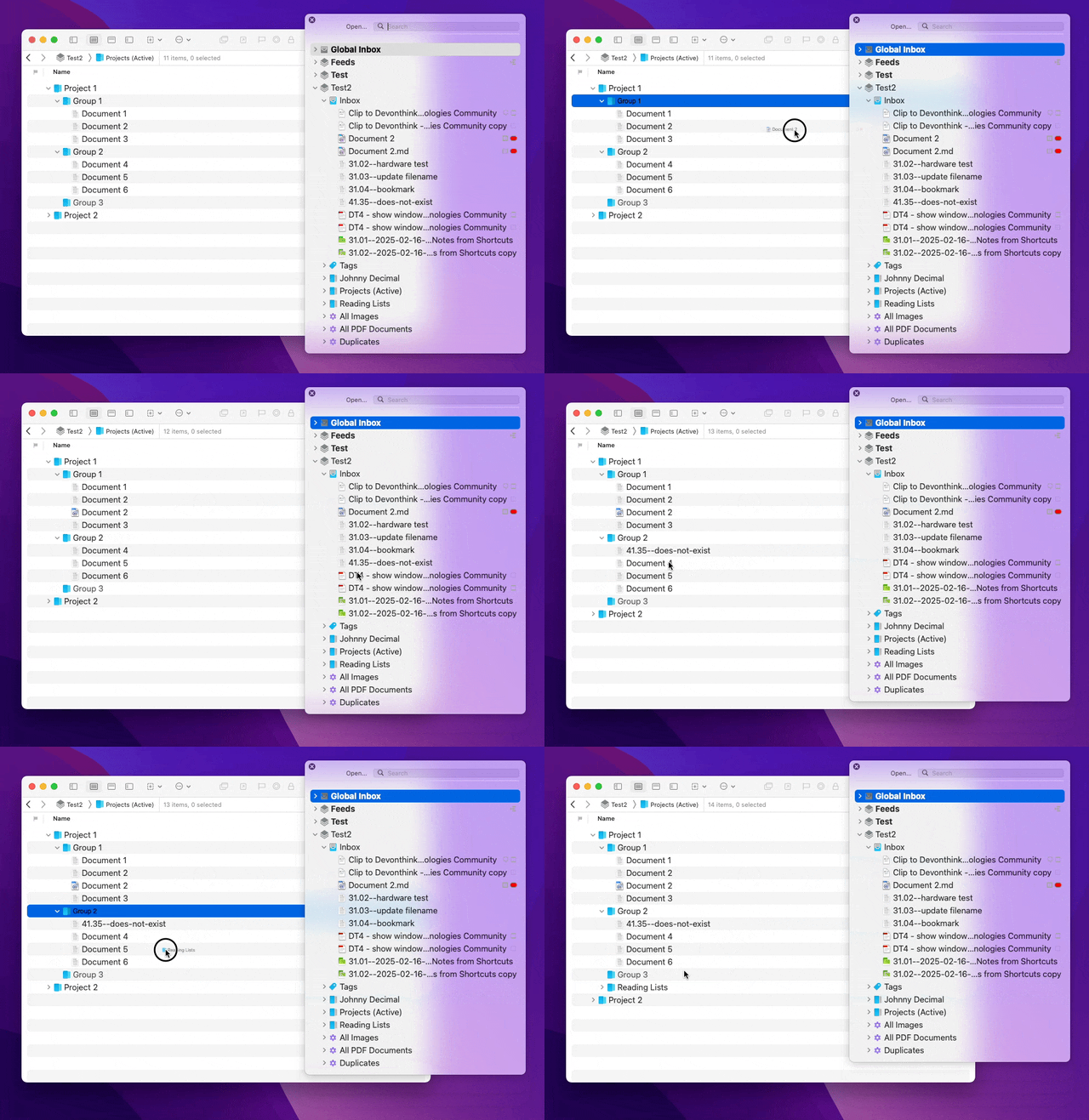
Well… Have you tried the _Go \> To Document_ popover? I guess it’s mainly meant for opening stuff, but you can also drag & drop items FROM it TO other windows 😃 That seems to be exactly what you’re asking for.
---
### Author:  [@fredap](https://discourse.devontechnologies.com/u/fredap)
#### Post date: [March 15, 2026, 2:28pm UTC](https://discourse.devontechnologies.com/t/need-some-help-creating-a-move-here-script/86575/13 "2026-03-15T14:28:22Z")
> [@uimike](#):
>
> fred, I was thinking of something like launching a (the?) sorter that allowed me to navigate, potentially search, and move the selected record into “A”. Maybe something like this already exists and I’m just missing it.
This is a bit of a long shot, but if I would do it, I would use Keyboard Meastro. You could consider the following.
1. Start the script, typically by assigning a shortcut to it
2. The script would register the currently opened group using `AppleScript`
3. Keyboard Meastro would issue the command “To Document” as found in the Go menu
4. This would open the ‘Open dialog” where you can select the document you want to move
5. Keyboard Meastro would be waiting until the moment that the “Open dialog” is no longer visible on the screen, i.e. until the moment you have opened the document **OR** until you bailed out using escape
6. The script would register the currently opened group using `AppleScript`
7. In the case you bailed out, the group from step 2 and 6 would be identical. if they are identical bail out.
8. If it is different register the name of the file that has been selected.
9. Keyboard Meastro would issue the `AppleScript` to select the group as registered in step 2
10. Finally it would issue the `AppleScript` command to move the file to the group in front, i.e. the group registered in step 2
Everywhere where I write `AppleScript`, you could also use `JXA`.
---
### Author:  [@uimike](https://discourse.devontechnologies.com/u/uimike)
#### Post date: [March 15, 2026, 5:03pm UTC](https://discourse.devontechnologies.com/t/need-some-help-creating-a-move-here-script/86575/14 "2026-03-15T17:03:11Z")
Ha ha! Thanks Troej !
I KNEW I must had missed something…
This is exactly what I need.
I saw the Go \> To Group, but apparently never saw (all these years) the Go \> To Document right beneath it.
Tempus Fugit et Intelligentia
---
### Author:  [@uimike](https://discourse.devontechnologies.com/u/uimike)
#### Post date: [March 15, 2026, 5:05pm UTC](https://discourse.devontechnologies.com/t/need-some-help-creating-a-move-here-script/86575/15 "2026-03-15T17:05:27Z")
Thanks Fred!
In what has to be a huge mind f\*&t I never noticed the Go \> To Document that both you and troej alluded to (in fact, Troej mentioned Go To - and I always only saw the top item, Go To \> Group).
I will try and create the script you are mentioning to see how it performs!
---
### Author:  [@FrankT](https://discourse.devontechnologies.com/u/FrankT)
#### Post date: [March 15, 2026, 7:22pm UTC](https://discourse.devontechnologies.com/t/need-some-help-creating-a-move-here-script/86575/16 "2026-03-15T19:22:22Z")
> [@troejgaard](#):
>
> Well… Have you tried the _Go \> To Document_ popover? I guess it’s mainly meant for opening stuff, but you can also drag & drop items FROM it TO other windows 😃
A really useful feature that I didn’t know about. Unbelievable. Thanks so much for letting me know, @troejgaard 😀
Oh, and thanks @uimike if you hadn’t asked…
---
### Author:  [@troejgaard](https://discourse.devontechnologies.com/u/troejgaard)
#### Post date: [March 15, 2026, 7:38pm UTC](https://discourse.devontechnologies.com/t/need-some-help-creating-a-move-here-script/86575/17 "2026-03-15T19:38:47Z")
You’re welcome 😃 I honestly wasn’t aware of it either. But I thought there was a good chance it would work, so I gave it a try.
---
### Author:  [@FrankT](https://discourse.devontechnologies.com/u/FrankT)
#### Post date: [March 15, 2026, 7:39pm UTC](https://discourse.devontechnologies.com/t/need-some-help-creating-a-move-here-script/86575/18 "2026-03-15T19:39:54Z")
Haha, even better … you can actually keep the popovers for the groups and documents open at the same time so you can drag items back and forth. A revelation. For a dummy like me 🤣
---
### Author:  [@FrankT](https://discourse.devontechnologies.com/u/FrankT)
#### Post date: [March 15, 2026, 7:43pm UTC](https://discourse.devontechnologies.com/t/need-some-help-creating-a-move-here-script/86575/19 "2026-03-15T19:43:55Z")
> [@troejgaard](#):
>
> But I thought there was a good chance it would work, so I gave it a try.
Really? I would have thought those were exactly the kind of “windows” where that wouldn’t work. 🙂
---
### Author:  [@troejgaard](https://discourse.devontechnologies.com/u/troejgaard)
#### Post date: [March 15, 2026, 7:47pm UTC](https://discourse.devontechnologies.com/t/need-some-help-creating-a-move-here-script/86575/20 "2026-03-15T19:47:00Z")
I already knew you can drag & drop things onto the _Go to Group_ popover, so it didn’t seem like that big a leap 😉
[Next page](https://discourse.devontechnologies.com/t/need-some-help-creating-a-move-here-script/86575.md?page=2)