# Rate from the keyboard
**URL:** https://discourse.devontechnologies.com/t/rate-from-the-keyboard/59225
**Category:** DEVONthink
**Tags:** automation
**Created:** [November 2, 2020, 7:50am UTC](https://discourse.devontechnologies.com/t/rate-from-the-keyboard/59225 "2020-11-02T07:50:12Z")
**Posts on this page:** 6
**Page:** 1
### Author:  [@zsbenke](https://discourse.devontechnologies.com/u/zsbenke)
#### Post date: [November 2, 2020, 7:50am UTC](https://discourse.devontechnologies.com/t/rate-from-the-keyboard/59225/1 "2020-11-02T07:50:12Z")
I’m trying to keep a food log in DEVONthink. The important part of my logging process is to rate the food I ate. I’m trying to do this quickly from the keyboard, but I can’t find any keyboard shortcuts to rate items from 1-5.
I tried to assign keyboard shortcuts to the Data-\>Rating menu options, but it doesn’t seem to work.
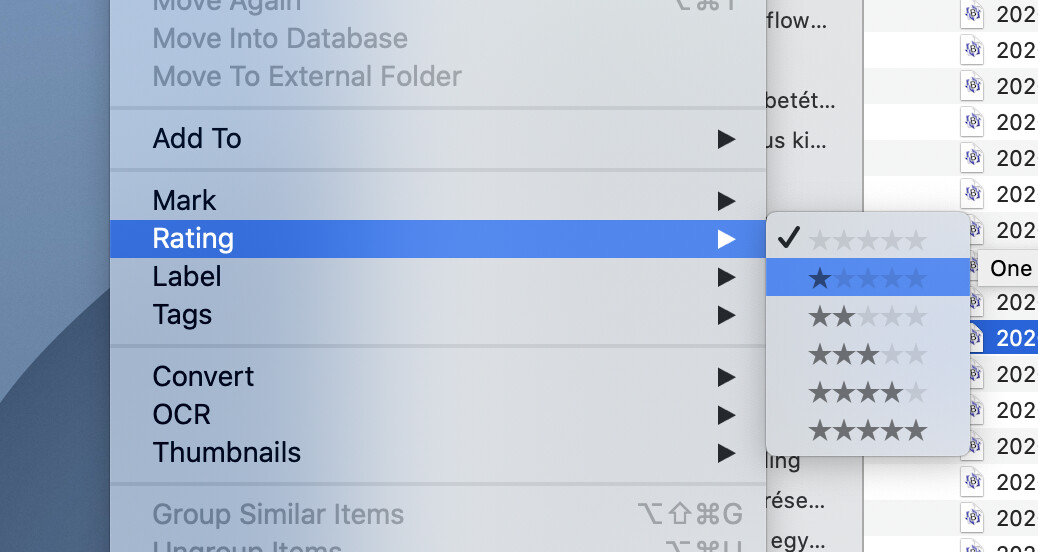

How can I achieve this?
---
### Author:  [@zsbenke](https://discourse.devontechnologies.com/u/zsbenke)
#### Post date: [November 2, 2020, 8:01am UTC](https://discourse.devontechnologies.com/t/rate-from-the-keyboard/59225/2 "2020-11-02T08:01:01Z")
Well, it seems like hacking but I wrote five simple scripts that sets the corresponding rating, and assigned keyboard shortcuts to these in the Script menu.

```auto
-- Import helper library
tell application "Finder" to set pathToAdditions to ((path to application id "DNtp" as string) & "Contents:Resources:Template Script Additions.scpt") as alias
set helperLibrary to load script pathToAdditions
-- Get the selection
tell application id "DNtp" to set thisSelection to the selection
-- Error handling
if thisSelection is {} then error localized string "Please select a document or group, then try again."
if (length of thisSelection) > 1 then error localized string "Please select only one document or group, then try again."
tell application id "DNtp"
set thisItem to first item of thisSelection
set rating of thisItem to 3
end tell
```
---
### Author:  [@chrillek](https://discourse.devontechnologies.com/u/chrillek)
#### Post date: [November 2, 2020, 8:32am UTC](https://discourse.devontechnologies.com/t/rate-from-the-keyboard/59225/3 "2020-11-02T08:32:45Z")
I tried to use a literal star there, like `Data->Rating->★`
(there are “black star” (UTF-8 E29885) and “black small star” (UTF-8 E2AD91) in the character palette)
That didn’t work, probably because there are always five stars, albeit some of them are disabled.
You _can_ define a shortcut with Better Touch Tool, though, because it permits to select menu entries by number. So in your case, you’d define `Data;Rating;(2)` as an action for your keyboard shortcut and get a 1 star rating.
---
### Author:  [@zsbenke](https://discourse.devontechnologies.com/u/zsbenke)
#### Post date: [November 2, 2020, 9:10am UTC](https://discourse.devontechnologies.com/t/rate-from-the-keyboard/59225/4 "2020-11-02T09:10:53Z")
I don’t think it’s feasible to install Better Touch Tool just for this. 🙂
Maybe @BLUEFROG knows something that can be done without scripting and 3rd-party tools.
---
### Author:  [@chrillek](https://discourse.devontechnologies.com/u/chrillek)
#### Post date: [November 2, 2020, 9:23am UTC](https://discourse.devontechnologies.com/t/rate-from-the-keyboard/59225/5 "2020-11-02T09:23:57Z")
It’s certainly “feasible” 😉 But if it’s worthwile, is up to you. Since I have it anyway, I used it.
I also tried with Keyboard Maestro, but it wouldn’t show me the entries below “Rating”, presumably because they’re not character strings?
---
### Author:  [@zsbenke](https://discourse.devontechnologies.com/u/zsbenke)
#### Post date: [November 2, 2020, 9:51am UTC](https://discourse.devontechnologies.com/t/rate-from-the-keyboard/59225/6 "2020-11-02T09:51:50Z")
> It’s certainly “feasible” 😉
Well, used the wrong word… 🙂