# Rename using Custom Data for human being
**URL:** https://discourse.devontechnologies.com/t/rename-using-custom-data-for-human-being/69820
**Category:** DEVONthink
**Tags:** automation
**Created:** [February 26, 2022, 10:31pm UTC](https://discourse.devontechnologies.com/t/rename-using-custom-data-for-human-being/69820 "2022-02-26T22:31:41Z")
**Posts on this page:** 20
**Page:** 1
### Author:  [@olivenoire](https://discourse.devontechnologies.com/u/olivenoire)
#### Post date: [February 26, 2022, 10:31pm UTC](https://discourse.devontechnologies.com/t/rename-using-custom-data-for-human-being/69820/1 "2022-02-26T22:31:41Z")

Hi,
Because this is not implemented in DT, I’m trying to understand how to rename files using Custom MetaData.
Seems we can use something like those things :
1. “AppleScript”. I absolutely don’t know what it is and how to record or what to do
2. There is a \*rename using RegEx" menu. Unable to use it. What is RegEx?
3. Seems we can use Ajax ? (hu?)
I simply want to use the “identifiant” to rename my file
But I’m not a software engineer and to not have time to learn but to use my data
Any help welcome
---
### Author:  [@DTLow](https://discourse.devontechnologies.com/u/DTLow)
#### Post date: [February 26, 2022, 10:42pm UTC](https://discourse.devontechnologies.com/t/rename-using-custom-data-for-human-being/69820/2 "2022-02-26T22:42:28Z")
> [@olivenoire](#):
>
> how to rename files … Applescript
When processing inbox items, I use an Applescript to rename the file;
see sample below for _set name of theNote to theTitle_
I use additional code to derive _theTitle_; it can reference custom metadata
```auto
tell application id "DNtp"
set theNote to move record theNote to theFilingGroup
set name of theNote to theTitle
end tell
```
---
### Author:  [@pete31](https://discourse.devontechnologies.com/u/pete31)
#### Post date: [February 27, 2022, 3:20am UTC](https://discourse.devontechnologies.com/t/rename-using-custom-data-for-human-being/69820/3 "2022-02-27T03:20:15Z")
> [@olivenoire](#):
>
> I simply want to use the “identifiant” to rename my file
This script renames based on Custom Meta Data.
Please try it with duplicates.
## Setup
- Open `Script Editor.app`
- Paste the script
- Replace `mdextags ` in line `set thisRecord_CustomMetaData_Value to mdextags of thisRecord_CustomMetaData` with `md` plus your Custom Meta Data identifier
- Save script to DEVONthink’s script menu folder
`~/Library/Application Scripts/com.devon-technologies.think3/Menu/`
## Usage
- Select some records in the item list (or one of the other views).
- Run script via DEVONthink’s script menu.
```auto
-- Rename records based on Custom Meta Data
tell application id "DNtp"
try
set theRecords to selected records
if theRecords = {} then error "Please select some records"
repeat with thisRecord in theRecords
set thisRecord_CustomMetaData to custom meta data of thisRecord
try
set thisRecord_CustomMetaData_Value to mdextags of thisRecord_CustomMetaData -- replace mdextags with "md" plus your identifier
set name of thisRecord to thisRecord_CustomMetaData_Value
end try
end repeat
on error error_message number error_number
if the error_number is not -128 then display alert "DEVONthink" message error_message as warning
return
end try
end tell
```
---
### Author:  [@olivenoire](https://discourse.devontechnologies.com/u/olivenoire)
#### Post date: [February 27, 2022, 9:23am UTC](https://discourse.devontechnologies.com/t/rename-using-custom-data-for-human-being/69820/4 "2022-02-27T09:23:08Z")
Hi,
Thank you for your answer.
I’ve put a test file in Inbox and run the script but nothing happens.
When I launch this script from AppleScript an error occurs
What is it this script supposed to do?
It opens a box or something and then I manually enter the name?
About the error : do I have something to do with “the note” variable?

---
### Author:  [@olivenoire](https://discourse.devontechnologies.com/u/olivenoire)
#### Post date: [February 27, 2022, 9:34am UTC](https://discourse.devontechnologies.com/t/rename-using-custom-data-for-human-being/69820/5 "2022-02-27T09:34:13Z")
Thank you to give some of your time to help me.
I’ve edited the script this way but nothing happen (I don’t know how to embed this script in this message) :
```auto
-- Rename records based on Custom Meta Data
tell application id "DNtp"
try
set theRecords to selected records
if theRecords = {} then error "Please select some records"
repeat with thisRecord in theRecords
set thisRecord_CustomMetaData to custom meta data of thisRecord
try
set thisRecord_CustomMetaData_Value to md_company of thisRecord_CustomMetaData -- replace mdextags with "md" plus your identifier
set name of thisRecord to thisRecord_CustomMetaData_Value
end try
end repeat
on error error_message number error_number
if the error_number is not -128 then display alert "DEVONthink" message error_message as warning
return
end try
end tell
```
What I want is to rename the selected file with those 3 identifier :
- company
- date (need to be yyyymmdd)
- objet
As a result my files will be organized by emitter / date and objet.
(in next lige I will learn to use IA to detect date and other stuff) 🙂
---
### Author:  [@pete31](https://discourse.devontechnologies.com/u/pete31)
#### Post date: [February 27, 2022, 9:42am UTC](https://discourse.devontechnologies.com/t/rename-using-custom-data-for-human-being/69820/6 "2022-02-27T09:42:22Z")
> [@olivenoire](#):
>
> run the script but nothing happens
Yes, it can’t run. The code contains several variables which are not declared in this code.
I guess @DTLow posted it to show how a record _theoretically_ could be renamed via AppleScript.
However, I think it’s not a good idea to post code that won’t run without modifications without making potential users aware of the fact that it won’t run. That’s especially important in case of users who have no scripting/programming background (yet).
---
### Author:  [@pete31](https://discourse.devontechnologies.com/u/pete31)
#### Post date: [February 27, 2022, 9:57am UTC](https://discourse.devontechnologies.com/t/rename-using-custom-data-for-human-being/69820/7 "2022-02-27T09:57:44Z")
> [@olivenoire](#):
>
> I simply want to use the “identifiant” to rename my file
I posted a [script](https://discourse.devontechnologies.com/t/rename-using-custom-data-for-human-being/69820/3) that does what you asked for in your first post.
> [@olivenoire](#):
>
> What I want is to rename the selected file with those 3 identifier :
>
> - company
> - date (need to be yyyymmdd)
> - objet
>
> As a result my files will be organized by emitter / date and objet.
Now you changed your goal. May I ask why? Did you initially forget to mention what your desired output names should look like? Please don’t take this as offensive, I’m really just curious.
It’s always a good idea to
- post an example of the desired output (e.g. `Apple - 2022-02-27 - MacBook Pro`)
- post the `type` of your Custom Meta Data
---
### Author:  [@DTLow](https://discourse.devontechnologies.com/u/DTLow)
#### Post date: [February 27, 2022, 10:11am UTC](https://discourse.devontechnologies.com/t/rename-using-custom-data-for-human-being/69820/8 "2022-02-27T10:11:19Z")
> [@olivenoire](#):
>
> I’ve put a test file in Inbox and run the script but nothing happens.
> When I launch this script from AppleScript an error occurs
> What is it this script supposed to do?
As per @pete31, this was not a complete script - just sample code to illustrate **renaming a file**
I did mention “additional code”; the post is edited to say “sample”
I’m sorry this wasn’t clearer
It’s not the first time that someone copies code without thought or understanding,
and reports “it doesn’t work”
There’s also the problem with clearly defined requirements
> About the error : do I have something to do with “the note” variable?
As per the error message, you have to define variable _theNote_
There are various options using additional code; I like the \*selected records" in the above script
---
### Author:  [@olivenoire](https://discourse.devontechnologies.com/u/olivenoire)
#### Post date: [February 27, 2022, 7:49pm UTC](https://discourse.devontechnologies.com/t/rename-using-custom-data-for-human-being/69820/9 "2022-02-27T19:49:41Z")
> [@pete31](#):
>
> Now you changed your goal. May I ask why? Did you initially forget to mention what your desired output names should look like? Please don’t take this as offensive, I’m really just curious.
>
> It’s always a good idea to
>
> - post an example of the desired output (e.g. `Apple - 2022-02-27 - MacBook Pro`)
> - post the `type` of your Custom Meta Data
Hello,
In fact I did not change but was not able to explain what I want to do at first.
I thought I was far easier and while thinking about it, I discovered date format is not the same.
I thought I was simply able to catch the data and use it as a name. But it seems far far far much complex.
Just need to manage file not become a software engineer 🙂
My desire output is exactly this " emitter - yyyymmdd - object"
> [@pete31](#):
>
> That’s especially important in case of users who have no scripting/programming background (yet).
You are right, I have exactly no background at all. For me Applescript is absolutely not understandable.
It seems it will take month to understand what to do with Applescript.
> [@pete31](#):
>
> > [@olivenoire](#):
> >
> > I simply want to use the “identifiant” to rename my file
>
> I posted a [script](https://discourse.devontechnologies.com/t/rename-using-custom-data-for-human-being/69820/3) that does what you asked for in your first post.
Hello
Thank for your time.
Your script does not work either. Nothing happen.
In fact, I don’t understand what do I have to adapt.
I’ve change
```auto
set thisRecord_CustomMetaData_Value to mdextags of thisRecord_CustomMetaData -- replace mdextags with "md" plus your identifier
set thisRecord_CustomMetaData_Value to md_company of thisRecord_CustomMetaData -- replace mdextags with "md" plus your identifier
```
But nothing happen.
I’me really afraid I can’t conclude this project easily,
---
### Author:  [@olivenoire](https://discourse.devontechnologies.com/u/olivenoire)
#### Post date: [February 27, 2022, 8:16pm UTC](https://discourse.devontechnologies.com/t/rename-using-custom-data-for-human-being/69820/12 "2022-02-27T20:16:36Z")
> [@pete31](#):
>
> Now you changed your goal. May I ask why? Did you initially forget to mention what your desired output names should look like? Please don’t take this as offensive, I’m really just curious.
>
> It’s always a good idea to
>
> - post an example of the desired output (e.g. `Apple - 2022-02-27 - MacBook Pro`)
> - post the `type` of your Custom Meta Data
Here are the type of data :
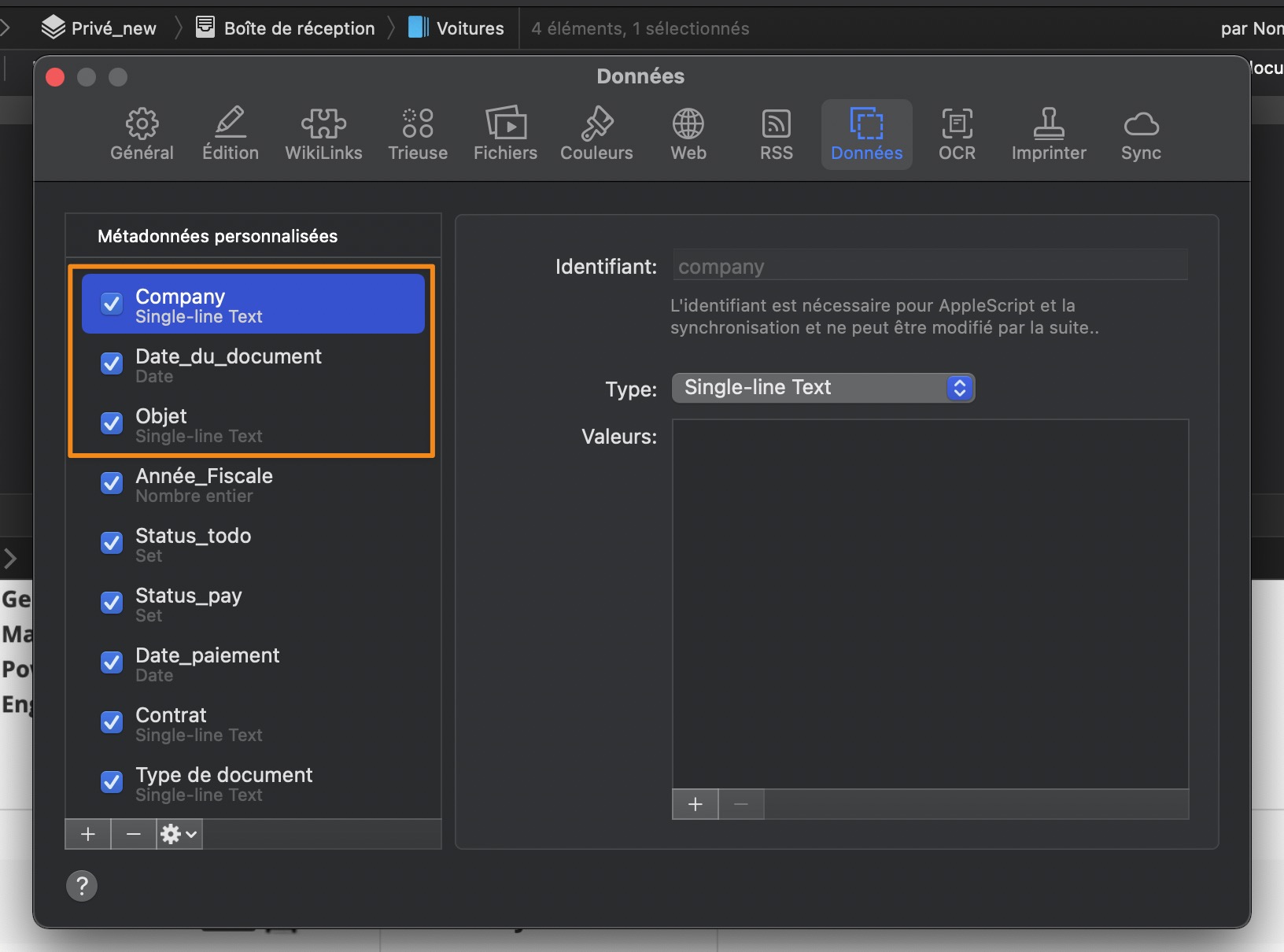
And the ideal output 🙂 (manually encoded)
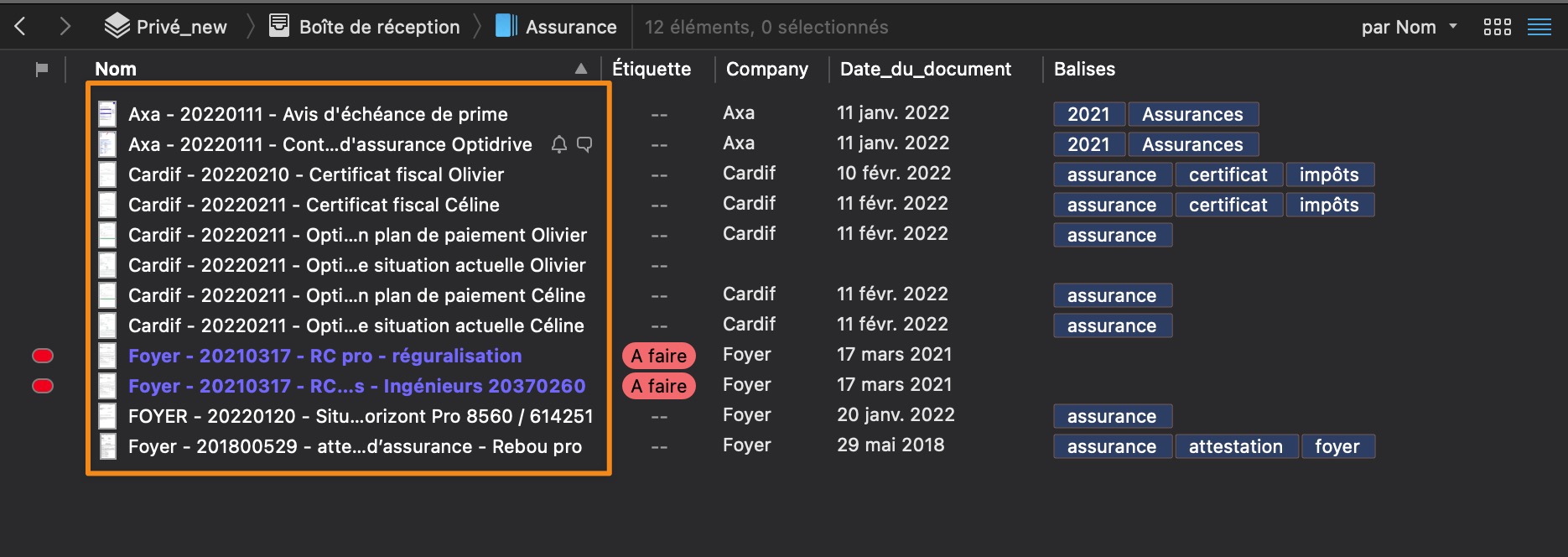
Strangly, the document date is not dd/mm/yyyy but dd/mmmm./yyyy 🙂
---
### Author:  [@pete31](https://discourse.devontechnologies.com/u/pete31)
#### Post date: [February 27, 2022, 9:00pm UTC](https://discourse.devontechnologies.com/t/rename-using-custom-data-for-human-being/69820/13 "2022-02-27T21:00:15Z")
> [@olivenoire](#):
>
> `md_company`
Why do you put an undescore between „md“ and your identifier?
---
### Author:  [@olivenoire](https://discourse.devontechnologies.com/u/olivenoire)
#### Post date: [February 27, 2022, 9:17pm UTC](https://discourse.devontechnologies.com/t/rename-using-custom-data-for-human-being/69820/14 "2022-02-27T21:17:21Z")
> [@pete31](#):
>
> Why do you put an undescore between „md“ and your identifier?
Because if do not put the underscore, I can’t save the file and got an error message

And if I had a “+”, I can save but nothing happen either

---
### Author:  [@pete31](https://discourse.devontechnologies.com/u/pete31)
#### Post date: [February 27, 2022, 9:21pm UTC](https://discourse.devontechnologies.com/t/rename-using-custom-data-for-human-being/69820/15 "2022-02-27T21:21:53Z")
The error is expected behavior because you didn’t change the line correctly.
Please read my instructions again. Then look at my example line. Then look at your changed line. Do you find the difference?
---
### Author:  [@olivenoire](https://discourse.devontechnologies.com/u/olivenoire)
#### Post date: [February 27, 2022, 9:31pm UTC](https://discourse.devontechnologies.com/t/rename-using-custom-data-for-human-being/69820/16 "2022-02-27T21:31:00Z")
> [@olivenoire](#):
>
> `replace mdextags with "md" plus your identifier`
I can’t understand. I’ve replaced mdextags
That’s crazy, I can’t see from where comes the problem. Do I become silly?
You write “replace mdextags with “md” plus your identifier”
Do I need to write md or “md”?
So in empiric way :
if I add “plus” : error

Same here.
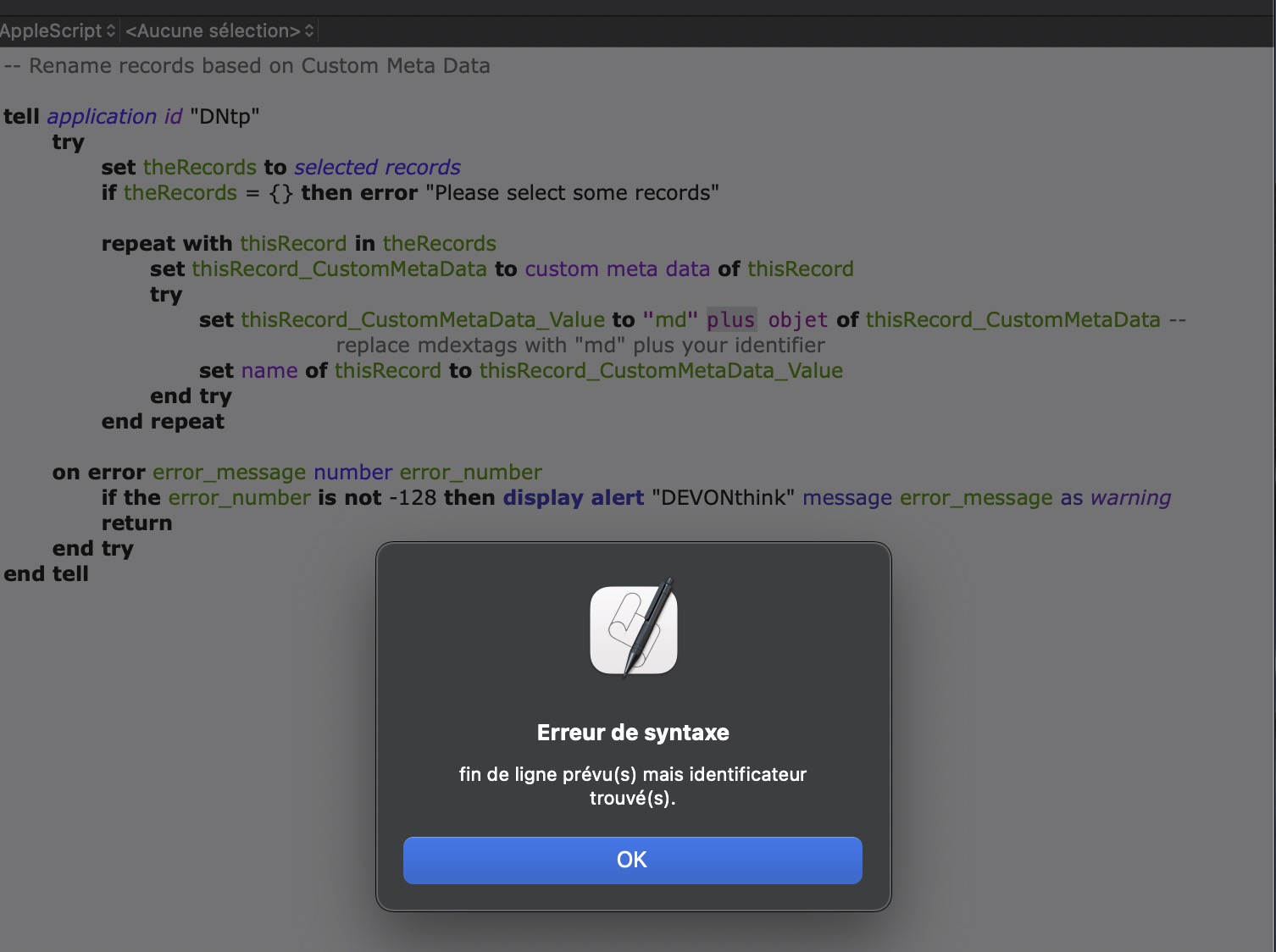
Really I do not see what to do??
---
### Author:  [@pete31](https://discourse.devontechnologies.com/u/pete31)
#### Post date: [February 27, 2022, 9:36pm UTC](https://discourse.devontechnologies.com/t/rename-using-custom-data-for-human-being/69820/17 "2022-02-27T21:36:56Z")
> [@olivenoire](#):
>
> Do I need to write md or “md”?
Look at my example line.
---
### Author:  [@chrillek](https://discourse.devontechnologies.com/u/chrillek)
#### Post date: [February 27, 2022, 9:38pm UTC](https://discourse.devontechnologies.com/t/rename-using-custom-data-for-human-being/69820/18 "2022-02-27T21:38:35Z")
“md plus your identifier means”
`mdidentifier`
not
`md_identifier`
nor
`md identifier`
---
### Author:  [@olivenoire](https://discourse.devontechnologies.com/u/olivenoire)
#### Post date: [February 27, 2022, 9:42pm UTC](https://discourse.devontechnologies.com/t/rename-using-custom-data-for-human-being/69820/19 "2022-02-27T21:42:38Z")
Great!!
Understood. mdextags means _metadata extags_… really hard to reverse engineering such a thing
I’ve tried “md”+; mdplus; etc etc
Finally it works thanks.
Next step, concatenate more metadata and reverse date dd/mm/yyyy in yyyymmdd format 🙂
---
### Author:  [@pete31](https://discourse.devontechnologies.com/u/pete31)
#### Post date: [February 27, 2022, 9:44pm UTC](https://discourse.devontechnologies.com/t/rename-using-custom-data-for-human-being/69820/20 "2022-02-27T21:44:38Z")
> [@olivenoire](#):
>
> Next step, concatenate more metadata and reverse date dd/mm/yyyy in yyyymmdd format 🙂
I‘ll leave this to you.
---
### Author:  [@olivenoire](https://discourse.devontechnologies.com/u/olivenoire)
#### Post date: [February 27, 2022, 9:45pm UTC](https://discourse.devontechnologies.com/t/rename-using-custom-data-for-human-being/69820/21 "2022-02-27T21:45:28Z")
great, thank you
seems pretty hard, but how knows
will try this : [AppleScript string tip: How to concatenate strings | alvinalexander.com](https://alvinalexander.com/blog/post/mac-os-x/applescript-concatenate-strings/)
---
### Author:  [@olivenoire](https://discourse.devontechnologies.com/u/olivenoire)
#### Post date: [February 27, 2022, 10:06pm UTC](https://discourse.devontechnologies.com/t/rename-using-custom-data-for-human-being/69820/22 "2022-02-27T22:06:01Z")
I reply to myself if one day somebody wants to do the same thing without have to learn a new langage etc
> [@Rename with last day of month when source only contains year-month](https://discourse.devontechnologies.com/t/rename-with-last-day-of-month-when-source-only-contains-year-month/68175/5):
>
> The record is passed to the script See the skeleton script below on performSmartRule(theRecords) tell application id "DNtp" repeat with theRecord in theRecords \<\<\< insert code end repeat end tell end performSmartRule I’d like to rename it to has the last day of that month Here’s example code to get the last day of the month and rename the record set theName to name of theRecord set theName to theName & my LastDay(texts -6 thru -1 of t…
[Next page](https://discourse.devontechnologies.com/t/rename-using-custom-data-for-human-being/69820.md?page=2)