# Scan Name ~ Scan Amount
**URL:** https://discourse.devontechnologies.com/t/scan-name-scan-amount/56000
**Category:** DEVONthink
**Tags:** automation, devonthink3
**Created:** [May 25, 2020, 8:49am UTC](https://discourse.devontechnologies.com/t/scan-name-scan-amount/56000 "2020-05-25T08:49:46Z")
**Posts on this page:** 7
**Page:** 1
### Author:  [@Indigosans](https://discourse.devontechnologies.com/u/Indigosans)
#### Post date: [May 25, 2020, 8:49am UTC](https://discourse.devontechnologies.com/t/scan-name-scan-amount/56000/1 "2020-05-25T08:49:46Z")
Hello
I am trying to utilise the new scan name and scan amount, item scanning rule actions.
Previously I am using Custom Data fields that I have to manually enter but I am hoping that these new actions would automate this from a rule.
One use case for me is I scan all my receipts into Devonthink from a iOS App, Hazel tags these files and moves them to Devonthink Inbox where I have set up rules to file to specific groups based on tag.
The file name I have chosen is Date\_Item\_amount ( 3-3-2020\_COFFEE\_2.62 )
Whilst I have the information in the file name I would prefer it separated out when I create a metadata overview
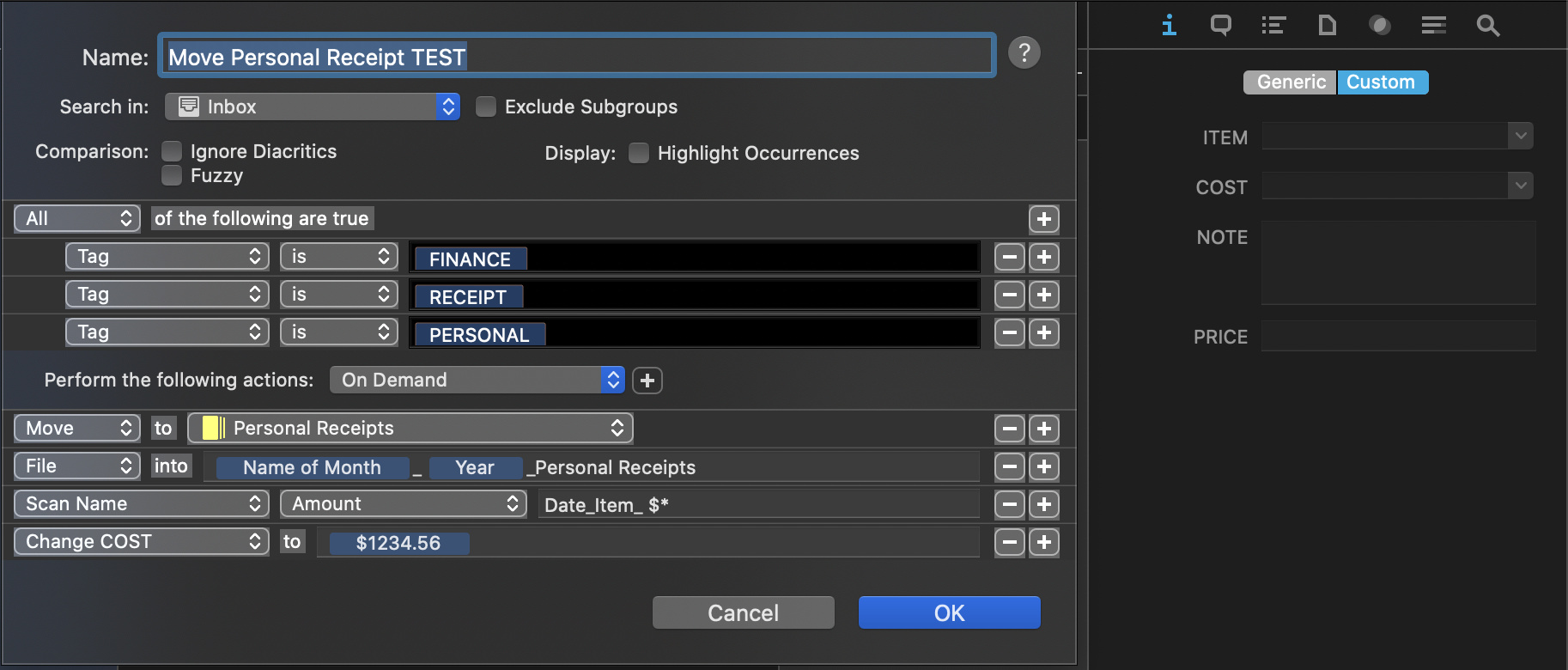
Please see screen shot
Which shows one example of the rule, I have tried, also the custom data fields that I am hoping to automate into ITEM and COST, both of which are single line text custom data fields
I do not use currency symbol in file name but I did try this
Also I added a price Custom data field at a previous attempt to see if Currency custom data was required
Change cost to field shows the placeholder for document amount.
At the moment I am just trying to get the Scan Name / Document Amount.
But hopefully will be able to scan both Item and amount in same rule
The Rule moves and files the file but does not change the cost custom data field
I have already looked in help too see if I am missing something
I am assuming I am getting the syntax of the scan name amount field wrong, or totally off the mark of what I can do ? Do I need to learn/Use regular expressions to parse from this file name?
Hope all is clear,Any ideas ?
And thanks in advance for any help
---
### Author:  [@cgrunenberg](https://discourse.devontechnologies.com/u/cgrunenberg)
#### Post date: [May 25, 2020, 10:38am UTC](https://discourse.devontechnologies.com/t/scan-name-scan-amount/56000/2 "2020-05-25T10:38:58Z")
> [@Indigosans](#):
>
> I am assuming I am getting the syntax of the scan name amount field wrong, or totally off the mark of what I can do ? Do I need to learn/Use regular expressions to parse from this file name?
This seems to be correct actually. Could you please export this smart rule plus a sample file that should be processed by it and send them to cgrunenberg - at - [devon-technologies.com](http://devon-technologies.com)? Then I could test this over here - thanks in advance!
---
### Author:  [@indiewelt](https://discourse.devontechnologies.com/u/indiewelt)
#### Post date: [January 13, 2021, 3:40pm UTC](https://discourse.devontechnologies.com/t/scan-name-scan-amount/56000/3 "2021-01-13T15:40:13Z")
Hi - Do you have an update on this? Does it work? I would be interested.
On a sidenote - how do you define the syntax “Date\_item\_$\*” ? I checked the handbook but could not find an explanation how to structure this. I would like to use this feature also for similar requests (e.g. scan for dates in file name and change creation date accordingly)
---
### Author:  [@BLUEFROG](https://discourse.devontechnologies.com/u/BLUEFROG)
#### Post date: [January 14, 2021, 7:45am UTC](https://discourse.devontechnologies.com/t/scan-name-scan-amount/56000/4 "2021-01-14T07:45:27Z")
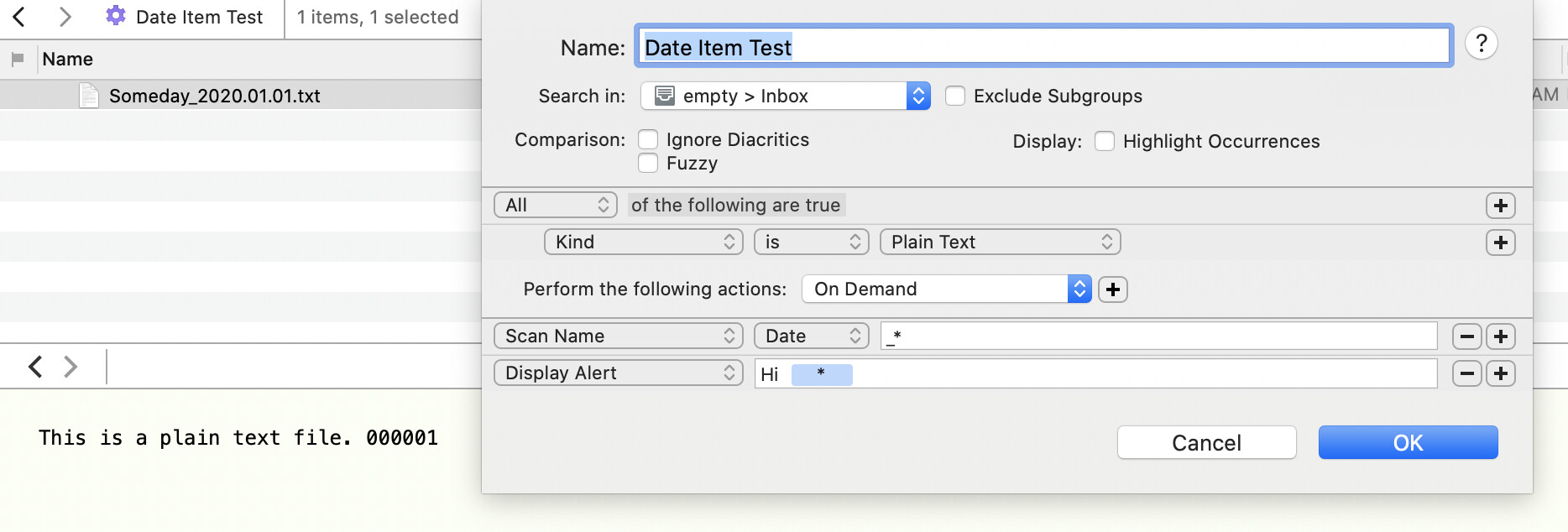
This smart rule isn’t detecting a date in the name. The alert only displays _Hi_.
Also, if using the `string` option, this will return the rest of the filename, including the extension.
---
### Author:  [@cgrunenberg](https://discourse.devontechnologies.com/u/cgrunenberg)
#### Post date: [January 14, 2021, 8:13am UTC](https://discourse.devontechnologies.com/t/scan-name-scan-amount/56000/5 "2021-01-14T08:13:21Z")
> [@BLUEFROG](#):
>
> This smart rule isn’t detecting a date in the name
Only the body is scanned for dates.
---
### Author:  [@BLUEFROG](https://discourse.devontechnologies.com/u/BLUEFROG)
#### Post date: [January 14, 2021, 8:16am UTC](https://discourse.devontechnologies.com/t/scan-name-scan-amount/56000/6 "2021-01-14T08:16:25Z")
So just RegEx it for names then?
---
### Author:  [@cgrunenberg](https://discourse.devontechnologies.com/u/cgrunenberg)
#### Post date: [January 14, 2021, 8:18am UTC](https://discourse.devontechnologies.com/t/scan-name-scan-amount/56000/7 "2021-01-14T08:18:28Z")
That’s probably the best option, at least if the date format is known.