# Where do i see my sync locations in DTTG? Please help minor panic ;)
**URL:** https://discourse.devontechnologies.com/t/where-do-i-see-my-sync-locations-in-dttg-please-help-minor-panic/74877
**Category:** Tips
**Tags:** sync
**Created:** [March 3, 2023, 11:12am UTC](https://discourse.devontechnologies.com/t/where-do-i-see-my-sync-locations-in-dttg-please-help-minor-panic/74877 "2023-03-03T11:12:52Z")
**Posts on this page:** 9
**Page:** 1
### Author:  [@jessebaldwin](https://discourse.devontechnologies.com/u/jessebaldwin)
#### Post date: [March 3, 2023, 11:12am UTC](https://discourse.devontechnologies.com/t/where-do-i-see-my-sync-locations-in-dttg-please-help-minor-panic/74877/1 "2023-03-03T11:12:52Z")
Hello DTers. I have a bit of a situation… I have used DT on a macbook for years, and recently installed DTTG on my iphone for note taking.
Well, my macbook fell into the sea and is completely dead. I have replaced it with a new machine, but i dont recall my sync method (location of the DBs, dropbox, or icloud, etc). I _do_ have them however on the iphone, that is, I see the databases, but in DTTG I can’t find the sync location in settings.
Can anyone advise how to ascertain from DTTG where my DBs live?
Many, many thanks!
Jesse
---
### Author:  [@BLUEFROG](https://discourse.devontechnologies.com/u/BLUEFROG)
#### Post date: [March 3, 2023, 11:42am UTC](https://discourse.devontechnologies.com/t/where-do-i-see-my-sync-locations-in-dttg-please-help-minor-panic/74877/2 "2023-03-03T11:42:32Z")
Welcome @jessebaldwin
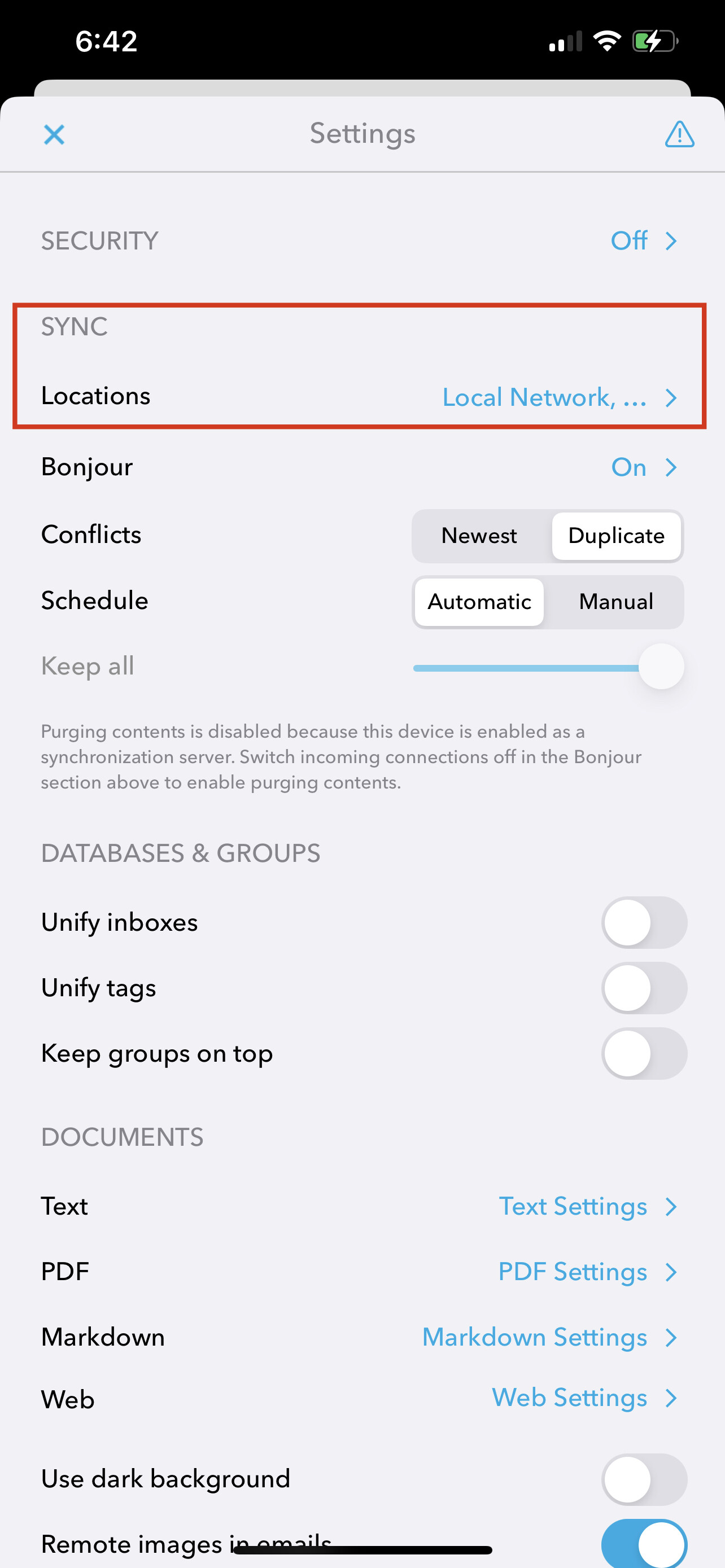
In DEVONthink To Go’s **Settings \> Sync: Locations**.
---
### Author:  [@jessebaldwin](https://discourse.devontechnologies.com/u/jessebaldwin)
#### Post date: [March 3, 2023, 1:12pm UTC](https://discourse.devontechnologies.com/t/where-do-i-see-my-sync-locations-in-dttg-please-help-minor-panic/74877/3 "2023-03-03T13:12:32Z")
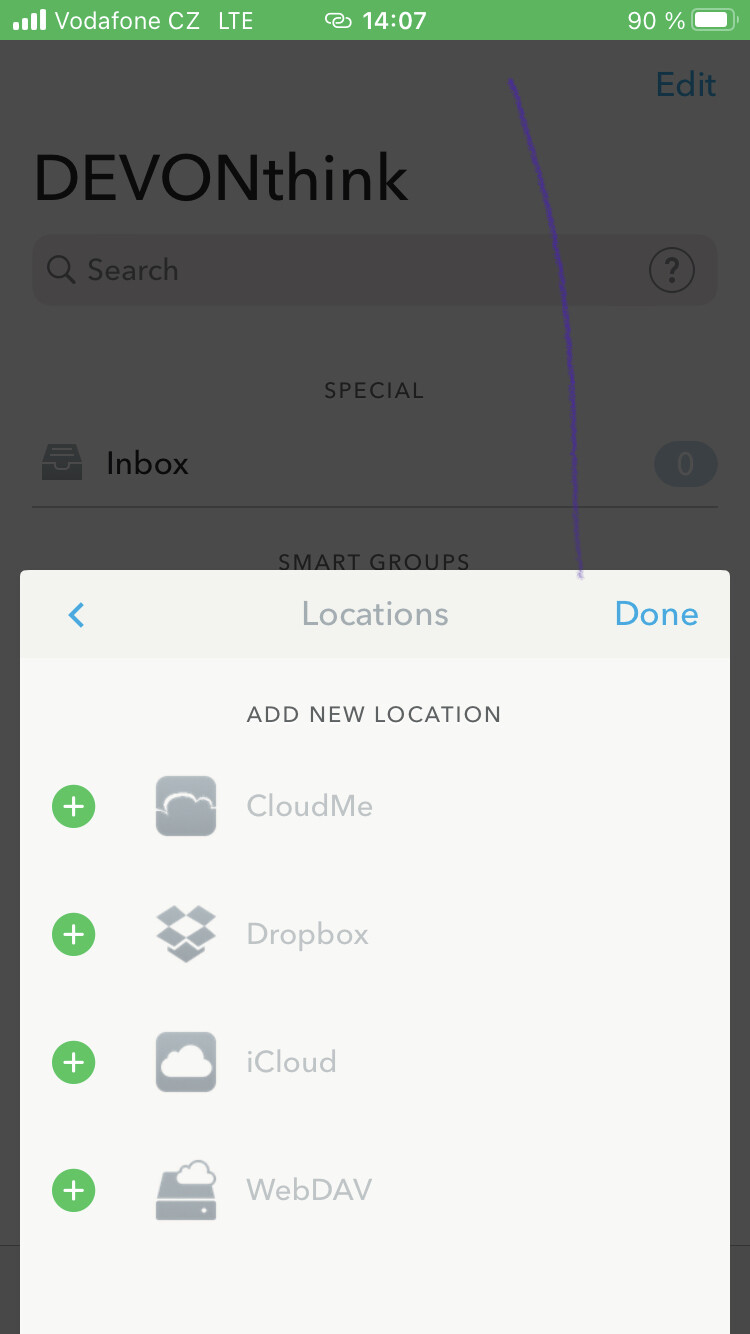
thank you so much Jim. The thing is, I don’t see any locations, just ‘add’ location (viz screenshot). though in my homescreen i can see DBs but i can’t see ‘where’ they are.
any thoughts? and again, many thanks!
---
### Author:  [@BLUEFROG](https://discourse.devontechnologies.com/u/BLUEFROG)
#### Post date: [March 3, 2023, 2:13pm UTC](https://discourse.devontechnologies.com/t/where-do-i-see-my-sync-locations-in-dttg-please-help-minor-panic/74877/4 "2023-03-03T14:13:31Z")
You’re welcome!
You’re not going to _see where your databases are_. That’s not how the filesystem regarding DEVONthink To Go in iOS works.
- Does DEVONthink To Go have the _master databases_?
- Did you get a new Mac?
---
### Author:  [@jessebaldwin](https://discourse.devontechnologies.com/u/jessebaldwin)
#### Post date: [March 5, 2023, 9:27am UTC](https://discourse.devontechnologies.com/t/where-do-i-see-my-sync-locations-in-dttg-please-help-minor-panic/74877/5 "2023-03-05T09:27:57Z")
hello Jim
I am ECSTATIC to say that i guessed a location/encryption combination and it worked! dancing on the ceiling right now, i thought i had lost years of notes and work.
So firstly _thank you_ for your helo, and secondly if you can please advise: how do i make sure this **never happens again!**. can i backup my data? or sync to two places?
many many thanks
Jesse
---
### Author:  [@rmschne](https://discourse.devontechnologies.com/u/rmschne)
#### Post date: [March 5, 2023, 9:35am UTC](https://discourse.devontechnologies.com/t/where-do-i-see-my-sync-locations-in-dttg-please-help-minor-panic/74877/6 "2023-03-05T09:35:32Z")
Best to read “A Word about Backups” in the “DEVONthink Manual”, page 19.
You should be backing up the DEVONthink databases on the machines on which they reside. Further, you should be backing up the entire machines regularly. Apple TimeMachine does this. TimeMachine will backup the DEVONthink databases residing on the machine.
The sync locations do not need to be backed up. They are files that DEVONthink only uses to sync between machines. Backup the machines with the data, not the sync locations.
Syncing is not backing up.
---
### Author:  [@BLUEFROG](https://discourse.devontechnologies.com/u/BLUEFROG)
#### Post date: [March 5, 2023, 9:48am UTC](https://discourse.devontechnologies.com/t/where-do-i-see-my-sync-locations-in-dttg-please-help-minor-panic/74877/7 "2023-03-05T09:48:04Z")
You’re welcome and I’m glad to be of service. 🙂
As @rmschne mentioned, sync is not a backup and you should be setting up proper backups. We strongly advocate proper primary backups using TimeMachine (or similar snapshot-style backup applications) and external drives. Also, you should read the series of articles we posted:
> **[DEVONtechnologies | Search & Find](https://www.devontechnologies.com/search?q=backups&from=blog%E2%80%8B)**
>
> DEVONtechnologies develops DEVONthink, DEVONagent, and other Mac and iOS apps for document and information management and web research.
PS: Don’t forget to scrub those footprints off your ceiling 😉
---
### Author:  [@jessebaldwin](https://discourse.devontechnologies.com/u/jessebaldwin)
#### Post date: [March 5, 2023, 9:48am UTC](https://discourse.devontechnologies.com/t/where-do-i-see-my-sync-locations-in-dttg-please-help-minor-panic/74877/8 "2023-03-05T09:48:57Z")
haha. Advice taken, thanks again for the help! Best from Prague. Jesse
---
### Author:  [@system](https://discourse.devontechnologies.com/u/system)
#### Post date: [March 4, 2026, 9:49am UTC](https://discourse.devontechnologies.com/t/where-do-i-see-my-sync-locations-in-dttg-please-help-minor-panic/74877/9 "2026-03-04T09:49:32Z")
This topic was automatically closed 1095 days after the last reply. New replies are no longer allowed.