I’d appreciate it if someone could explain why, in this screenshot, the icons association with annotation files with Kind “pdf+text” are not the same as annotation files with Kind “rich text document.” I don’t have many of these but I can’t seem to fix the issue, either. I understand that annotation files are rich text - why do I have these pdf+text Kind items in a list generated by clicking on the Smart Group Annotation Files? All of these “problem children” do have annotation files and they are backlinked.

Did you check the „iconology“ section in the documentation?
What smart group are you referring to?
Bluefrog:
This one:

chrillek:
Yes, I did:
Here is the annotation file for May 23, 1926:
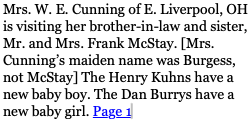
Why does this file have a “Kind” of PDF+Text when 99.99% of the others have “Rich…ment”?
What makes you think that the pdf+text is an annotation file? The icon indicates that it has one, not that it is one.
chrillek:
Read my initial post again. Nowhere did I write that the Kind: pdf+text was an annotation file. My question, to state it again, is this: Why do 99.99% of my annotation files show Kind: Rich…ment and only a very few show Kind: PDF+text. When I click on any one of those Kind: Rich..ment files, I see the annotation file. When I click on one that is Kind: PDF+text, I get nothing. But if I go to the actual clipping, it does have an annotation file, which I provided an example of.
If I have not been able to clearly state the issue, please so inform me.
The Annotations group is not a smart group. It is merely a special group and can contain any item you put into it. It’s only special since it’s the default location for Annotation files if the Files > General > Annotations popup is set to In shared group.
Bluefrog:
You’ll have to excuse my poor eyesight: the Smart Group icon has 8 points and the Special Group icon has 6 points. Thank you for the explanation of that item.
When I create an annotation file, it goes, by default to the Special Group Annotations, as you explained. What appears to be happening here (and it is only for 6 files out of 1,509) is that when I created the annotation file for these six files, a Rich text document was not created for some reason. Every annotation file in the Annotation Special Group is a Rich text document except for these 6 problem children. I even went so far as to delete one clipping, go to newspapers.com, download the clipping again and create a new annotation file. A rich text file was not created. Why is this happening?
You’ll ask, why is this important? Because, due to the nature of the documents I am working with, OCR is not entirely reliable. Add to that the fact that reporters were illiterate and typesetters might have had a hangover, along with torn newspapers, bad microfilm images, and faded print and there is the reason I am relying on these searchable annotation files to find information. DT has an extremely powerful search function and it is a delight to use, but GIGO.
You’re welcome.
There is no indication of an application process at play. I would hazard a guess the PDFs were unintentionally put into this location, by hand or potentially via a smart rule. It’s also possible you made the Annotation file in a different database, moved the PDF, and left the annotation file behind. It’s clear each have an associated Annotation file.
Select one of the PDFs, open the Annotations & Reminders inspector, and open the popup menu for the Annotation. Select Reveal to show where it’s located.
and
But I’m not a native speaker. I read that as: why does this annotation file have type PDF+text?
1 Like
Could any of this be from confusing PDF annotations with Devonthink annotation files?
Amontillado,
No, DT is fine. The issue that I’ve discovered has to do with the power of DT’s search engine and the woefully inadequate ability of OCR to render correct findings. I don’t doubt that there are very sophisticated OCR engines out there, but they are way more expensive than ABBYY, which is the engine that DT uses. For most users ABBYY is fine but it has limitations.
Actually, Abbyy FineReader has long been considered the top OCR engine available. “limitations” usually arise from poor quality and low contrast originals,
2 Likes
Bluefrog:
I dug deeper and have discovered what is going on. As you know from prior posts, I have an issue with the ability of OCR to render correct interpretations of newspaper clippings. The issue here is that this mixing of PDF+text and Rich…ment Kind documents happens when I select “All Databases.” If I just select the Annotations Special Group, nothing but Rich…ment Kind documents show in the search results list. If I go to All Databases, DT picks up hits on the keyword all databases, as it should, and that keyword is not necessarily in the Annotation file I created for the clipping. I can’t spend the time to make a complete transcription of every clipping so I am selective in what I enter in the annotation file. If I see a Kind: PDF+text hit in the search results for “All Databases,” all that means is that the keyword is not in the Annotation file. If the keyword is in the Annotation file and is correctly rendered by OCR, the search results will display both Rich…text and PDF+text. This is as it should be.
Problem solved but this is a “head’s up” for historians who do not know the limitations of OCR. In this particular case, the keyword was McStay. In several cases, OCR rendered that as “MeStay.” Naturally, that did not appear in a search for “McStay.”
Bluefrog:
ABBYY is indeed a very good OCR engine. But there are others out there which cost thousands of dollars that have better capabilities, which often includes AI. As always, it is never about anything other than money. I would never have learned about these issues if it had not been for the feature in DT that allows the display of the text layer as plain text.
Yes, there are highly specialized OCR systems (they’re actually beyond mere applications at this level) but none that would integrate with third-party apps like we have.
Fun fact: ~25 years ago, I worked at a service bureau that had a development division. They had a bespoke OCR application running thousands of pages per month for clients. They also sold the system, e.g., to universities and corporations, for over $100,000.
Fun fact 2: I worked in the newspaper industry early in my printing career. Delivering papers on a commercial route (about 200 customers) was my first job from 13 to 17. After that I worked at the news as a typesetter, pasteup tech, camera operator, and platemaker.
2 Likes
Platemaker, a job requiring courage beyond the everyday. You couldn’t run at the first drop of dragon’s blood.
1 Like
I was a platemaker at multiple companies and yes, my forearms and hands bear the proof. I’ve delivered more than one bloody plate in my life. And yes, I used dragon’s blood for negative touchups since I was a stripper (IYKYK  ) in more than one shop.
1 Like