I have
- an indexed folder on a NAS
- a smart rule that watches this folder and converts incoming PDFs to PDF+Text with DT’s OCR
- this worked flawlessly with DT4.3 and macOS 26.x
Now, I see this in the DT protocol, but only once (see below for follow-up)
21.09.26, 09:48:20: Unable to create an OCR document
21.09.26, 09:48:20: Texterkennung von 'Scan_20260920_153242_000786' fehlgeschlagen.
21.09.26, 09:48:20: Internal program error:
/Users/build/Build/TFS.Agent/_work/1/s/ROOT/FREngine/FREngine/src/FRDocument.cpp, 605.
Looks a bit weird to me, since I certainly never created a User named build on this machine, and there’s no build directory in my /Users.
Running OCR directly on the file works ok, BTW. So, here’s my smart rule:
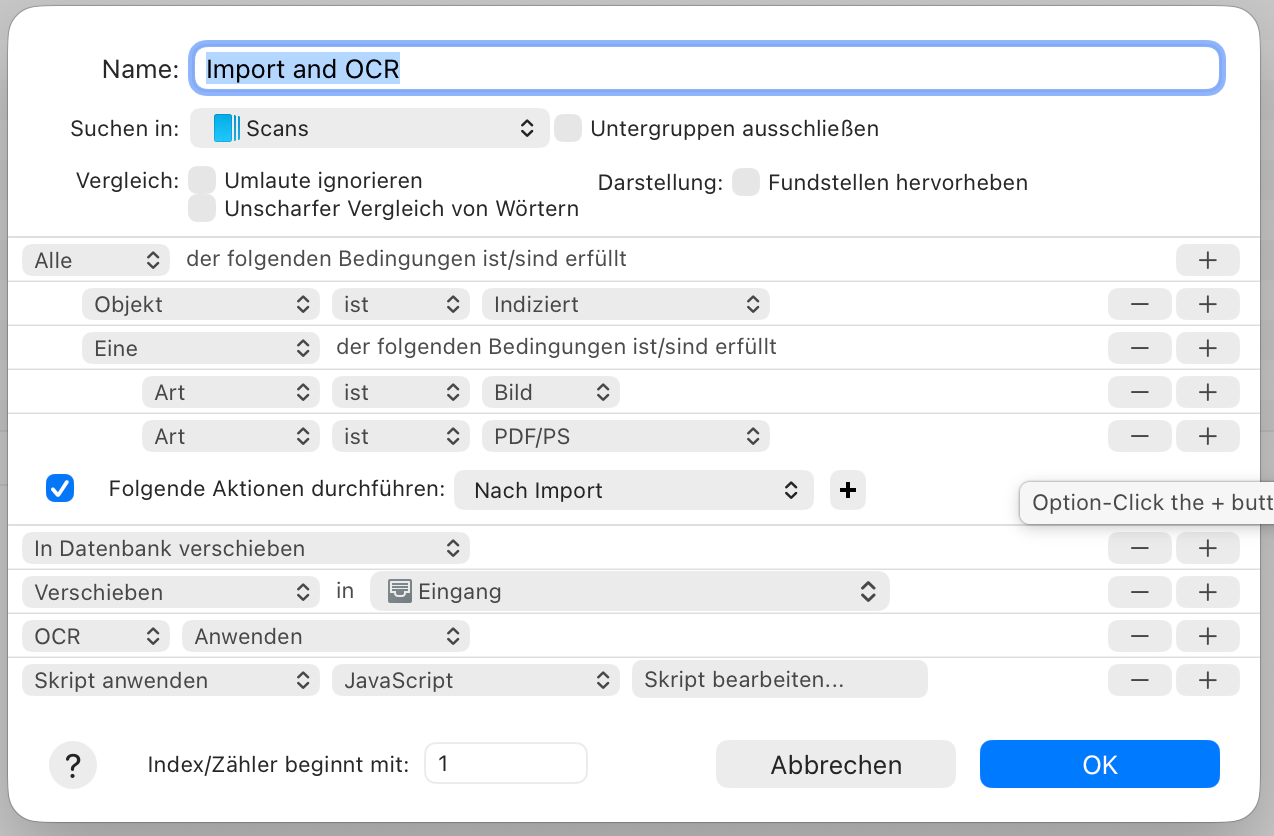
The script at the end only removes empty pages from the OCR’d PDF. It did never run in this situation.
Now I moved the original document back from the trash into the indexed folder and run the rule directly on it – no problem whatsoever.
And I found out that FREngine is a part of Abbyy’s OCR engine that relies on Rosetta. Which is on it’s way out of macOS…