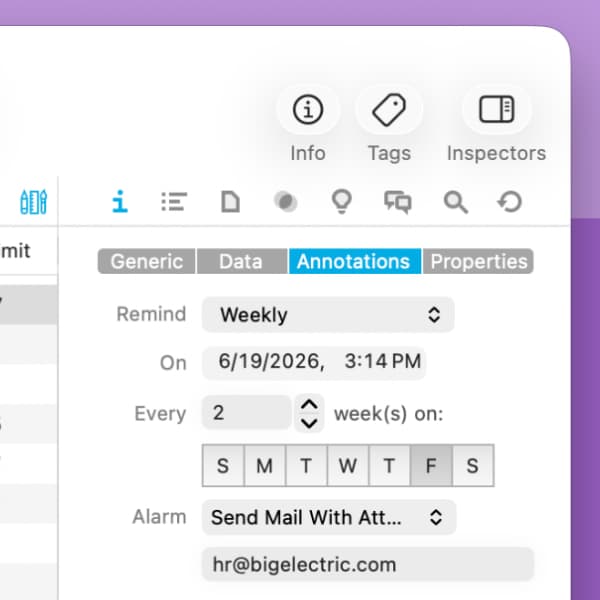
You can automate work in DEVONthink both interactively and unattended. Smart rules and reminders both support time-based actions. Smart rules’ time-based triggers run at intervals: every minute, hourly, daily, weekly. This is great for tasks that can run within a general timeframe, e.g., “This needs to be done sometime tomorrow”. But reminders have the advantage when precise scheduling is needed.
Reminders let you set exact times, days, and well-defined recurrences. You’ll have these options:
- Once: only trigger an alarm once.
- Hourly: run at a chosen time and interval.
- Daily: run at a chosen time, with a configurable day interval.
- Weekly: pick days of the week and interval (e.g., every two weeks).
- Monthly: choose a calendar day or an occurrence (e.g., second Thursday).
- Yearly: select months and occurrences.
While reminders have fewer built-in actions than smart rules, they still support a range of practical alarms: play a sound, send an email, open a document, or run a script. If you plan to automate via scripting, see Automation > Reminder Scripts in the Help for examples and details.
Imagine you have a timesheet you’d need to open every Friday before you leave work. Maybe you want to open the stock page in your browser every morning at 9:30 am. Or how about optimizing and creating a database archive on the last Sunday of each month? You can precisely schedule all these things with reminders. Add a reminder to a document in its Info > Annotations & Reminders inspector.
For broader, event-driven automation and reminders when you need more precise timing use smart rules. Pick the one that fits how precisely your task needs to be scheduled.
Note: Enable Settings > General > Enable reminder alarms to ensure your alarms will function properly.