Many people are interested in running local AI models but hardware limits what models you can run. Smaller models are less reliable, larger models are too much for most machines. But the popular AI application Ollama now offers access to some large models online, ones that can be used in DEVONthink or DEVONthink To Go.
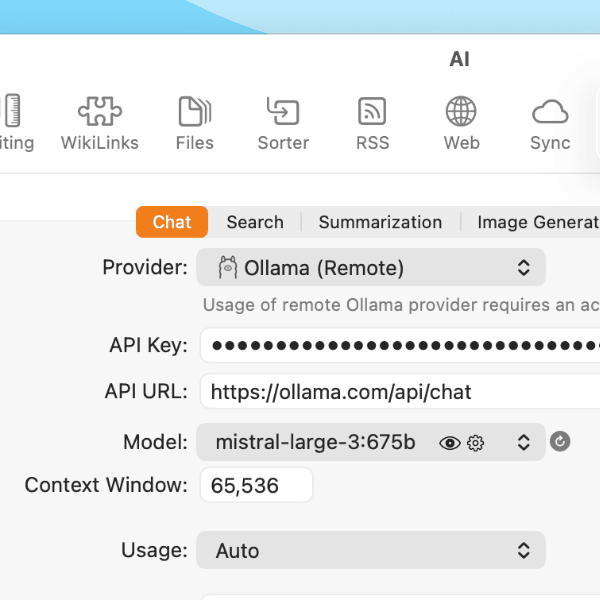
Ollama often is an entry point for people new to local AI. Recently, they started offering cloud models, providing access to many models including large LLMs like Mistral-large-4:675b (675 billion parameters!). In our testing, some of these models are very performant, keeping pace with commercial ones. To set up Ollama and these models in the higher editions of DEVONthink, do the following:
- Create an account on Ollama.com.
- Click on Keys then Add API Key. Enter a name to distinguish the key, e.g.,
Ollama Remotethen press Generate API Key. Copy this key and store it somewhere safe as you will not be able to copy it again. - If you haven’t downloaded the Ollama application, do so now and launch it.
- Control-click Ollama’s menubar icon, open the Settings, and sign into your Ollama account. This will register the device so you know what devices can access your Ollama cloud models. While not required, you can also copy and store the public key as a reference.
- Go into DEVONthink’s Settings > AI and choose Ollama (Remote) in the Provider popup.
- Copy and paste your API key into the API Key field.
- In the API URL field, enter:
https://ollama.com/api/chat. You should immediately see the Model popup display a model. Click on it to choose the online model you want to use.
To use this in DEVONthink To Go, follow steps 5-7 in the app’s Settings > AI.
If you’re interested, Ollama also offers paid services to access more models, etc. Bear in mind, AI models vary in capabilities, so one may be able to “read a document” and generate a Markdown document with a response, but not all of them can. We don’t control what they can and can’t do. You’ll need to test and become familiar with the model(s) you want to use.


